Category: News

  • Best Gaming Earbuds in Pakistan

    Best Gaming Earbuds in Pakistan

    Gaming earbuds have become a popular choice for mobile and PC gamers who want a comfortable and wireless audio experience without using large gaming headsets. The right gaming earbuds can make it easier to hear footsteps, game sounds, voice chat, and other important audio details while keeping your setup simple and portable.

    With so many wireless earbuds available in Pakistan, choosing the right pair can be confusing. Some earbuds focus on gaming performance, while others are designed mainly for music, calls, or everyday use. Features such as low latency, gaming mode, microphone quality, battery life, Bluetooth connectivity, and comfortable fit can make a big difference during gaming.

    In this guide, we will explain what to look for when choosing the best gaming earbuds in Pakistan and which features are important for a better gaming experience.

    What Are Gaming Earbuds?

    Gaming earbuds are wireless or wired earbuds designed to provide a better audio experience for gaming. Wireless gaming earbuds normally connect to a smartphone, tablet, laptop, or other compatible device through Bluetooth.

    Unlike regular earbuds, gaming-focused models may include features such as a dedicated gaming mode, low-latency audio, improved microphones, and sound tuning designed to make gaming sounds easier to hear.

    Gaming earbuds can be particularly useful for mobile games such as PUBG Mobile, Call of Duty Mobile, Free Fire, and other competitive games where sound can be an important part of gameplay.

    Why Is Low Latency Important for Gaming?

    Latency is one of the most important things to consider when buying wireless gaming earbuds.

    Latency refers to the delay between an action happening in a game and the corresponding audio reaching your ears. For example, if an opponent fires a weapon or takes a step nearby, you want to hear that sound as quickly as possible.

    A noticeable delay can make gaming less responsive, especially in competitive games where quick reactions matter.

    This is why many gaming earbuds offer a low-latency mode or gaming mode. These features are designed to reduce audio delay and provide a more responsive gaming experience.

    Bluetooth Version and Gaming

    Bluetooth is responsible for the wireless connection between your earbuds and gaming device. Modern wireless earbuds can come with Bluetooth versions such as Bluetooth 5.3 and Bluetooth 5.4.

    A newer Bluetooth version can provide improvements in wireless technology, but Bluetooth version alone does not guarantee lower gaming latency.

    If gaming performance is your priority, look for earbuds that specifically mention a gaming mode or low-latency feature. The complete hardware, software, codec, smartphone, and game can all affect latency.

    Gaming Mode Explained

    A gaming mode is a feature found on many gaming-focused wireless earbuds. When enabled, the earbuds may prioritize faster audio transmission to reduce the delay between the game and the sound you hear.

    This can be useful for competitive games where audio timing matters.

    However, gaming mode can sometimes affect other aspects of the wireless experience, so it is a good idea to use it when gaming and switch back to the normal mode for everyday listening when necessary.

    Sound Quality Matters in Gaming

    Low latency is important, but sound quality should not be ignored.

    Good gaming earbuds should provide clear audio so that you can hear different sounds in the game. Depending on the game, you may need to hear footsteps, vehicle sounds, gunshots, environmental sounds, or voice communication.

    A strong bass response can make explosions and action sounds more powerful, while clear mids and highs can help make voices and smaller sound details easier to hear.

    The best sound profile depends on the type of games you play and your personal preference.

    Gaming Earbuds for PUBG Mobile

    PUBG Mobile is one of the games where audio can play an important role. Players often rely on footsteps, gunshots, vehicle sounds, and other audio cues to understand what is happening around them.

    For PUBG Mobile, you should consider earbuds with low latency, clear directional audio, good microphone quality, and a comfortable fit.

    Wireless gaming earbuds can make the gaming setup more convenient because there are no long cables getting in the way while playing on a smartphone.

    Gaming Earbuds for Call of Duty Mobile

    Call of Duty Mobile also benefits from responsive audio. Whether you are playing multiplayer or another game mode, hearing footsteps and other sound effects clearly can improve your overall gaming experience.

    When choosing earbuds for Call of Duty Mobile, look for low latency, clear sound, good microphone performance, and stable wireless connectivity.

    Microphone Quality for Gaming

    Microphone quality is another important feature for gaming earbuds, especially if you regularly play multiplayer games with friends or teammates.

    A good microphone allows your teammates to hear your voice more clearly during voice chat. Poor microphone quality can make communication difficult, particularly in noisy environments.

    Some wireless earbuds use multiple microphones and noise-reduction technologies to improve voice communication.

    ENC, or Environmental Noise Cancellation, is commonly used to help reduce surrounding noise during calls and voice communication. However, the actual performance depends on the implementation of the specific earbuds.

    ANC vs ENC for Gaming

    ANC and ENC are different technologies, and it is important to understand the difference.

    ANC stands for Active Noise Cancellation. It is designed to reduce certain external sounds while you are listening to audio.

    ENC stands for Environmental Noise Cancellation. It is generally used to improve voice communication by helping reduce environmental noise captured by the microphones.

    For gaming, ANC can help you focus on game audio in noisy surroundings, while ENC can be useful when communicating with teammates.

    However, neither ANC nor ENC automatically makes earbuds good for gaming. Low latency, sound quality, microphone performance, and comfort are still important.

    Battery Life for Gaming Earbuds

    Battery life becomes especially important if you regularly play long gaming sessions.

    Wireless earbuds normally come with a charging case that provides additional battery power. When the earbuds are placed inside the case, they can recharge for the next gaming session.

    When comparing gaming earbuds, check both the advertised earbud playback time and the total battery capacity provided by the charging case.

    Remember that actual battery life can vary depending on volume, gaming mode, microphone usage, ANC, and other features.

    Comfort Is Important for Long Gaming Sessions

    If you play games for several hours, comfort should be one of your main priorities.

    Uncomfortable earbuds can become distracting during long sessions. The shape, weight, ear tips, and fit can all affect comfort.

    A secure fit is also important because you do not want the earbuds constantly moving or falling out while playing.

    Before buying gaming earbuds, consider whether their design is suitable for extended use.

    Wireless vs Wired Gaming Earbuds

    Both wireless and wired earbuds have advantages.

    Wireless gaming earbuds provide greater freedom of movement and eliminate cables. They can be especially convenient for mobile gaming.

    Wired earbuds do not require charging and can provide a direct connection to compatible devices. However, many modern smartphones no longer include a traditional headphone jack, which makes wireless earbuds more convenient for some users.

    If you choose wireless earbuds for gaming, pay particular attention to latency and gaming mode.

    Can Regular Wireless Earbuds Be Used for Gaming?

    Yes. Regular wireless earbuds can be used for gaming as long as they are compatible with your device.

    However, regular earbuds may not have features specifically designed for gaming. For competitive gaming, earbuds with a dedicated low-latency or gaming mode can be more suitable.

    If gaming is only an occasional activity for you, you may not need to purchase gaming-specific earbuds.

    How to Choose the Best Gaming Earbuds

    Before buying gaming earbuds, consider the following features:

    • Low latency: Important for responsive gaming audio.
    • Gaming mode: Useful for reducing audio delay.
    • Sound quality: Look for clear audio and a sound profile you enjoy.
    • Microphone: Important for multiplayer voice communication.
    • ENC: Can help with voice communication in noisy environments.
    • Battery life: Important for longer gaming sessions.
    • Comfort: Choose earbuds that fit securely and comfortably.
    • Bluetooth: Check compatibility with your smartphone or gaming device.
    • Charging case: Useful for keeping the earbuds charged between sessions.
    • Price: Choose features according to your budget and gaming needs.

    Best Gaming Earbuds for Mobile Gaming

    Mobile gamers usually need earbuds that are compact, comfortable, wireless, and easy to carry.

    Because mobile gaming sessions can be long, battery life and comfort are particularly important. Low latency is also useful for games where quick audio feedback matters.

    If you frequently switch between gaming and regular music listening, look for earbuds that provide a balanced combination of gaming and everyday features.

    Best Gaming Earbuds for Competitive Gaming

    Competitive gamers should pay more attention to latency and audio positioning than casual users.

    Being able to hear footsteps, gunshots, and other directional sounds can be important in competitive games. A dedicated gaming mode can also help reduce the delay between the game and your earbuds.

    Microphone quality is equally important if you play with teammates and communicate through in-game voice chat.

    Best Gaming Earbuds for Calls and Voice Chat

    If you use the same earbuds for gaming and phone calls, microphone quality becomes even more important.

    Look for earbuds with good microphones and ENC or other voice-processing features. This can help make communication clearer depending on the environment and product design.

    The Lecoo EW322 Wireless Earbuds are one option for users looking for wireless earbuds with ENC and HD sound.

    Gaming Earbuds With Bluetooth 5.3

    Bluetooth 5.3 is available in many modern wireless earbuds and can provide a reliable wireless connection when properly implemented.

    The ZORO ZX2 Wireless Earbuds feature Bluetooth 5.3 and ENC and are designed with gaming use in mind.

    They can be considered by gamers who want wireless earbuds for gaming along with features for everyday listening.

    What Makes a Gaming Earbud Different?

    A gaming earbud does not necessarily need to have every premium feature. What matters is whether its features match your gaming requirements.

    For example, a competitive mobile gamer may prioritize low latency and microphone quality, while a casual gamer may care more about comfort, battery life, and sound quality.

    Similarly, a person who uses the same earbuds for gaming, music, and calls may prefer a more balanced product rather than one focused only on gaming.

    Common Mistakes When Buying Gaming Earbuds

    Choosing Only by Bluetooth Version

    A newer Bluetooth number does not automatically mean better gaming performance. Look for gaming mode and low-latency features as well.

    Ignoring Microphone Quality

    If you play multiplayer games, communication is important. Always consider microphone quality before buying gaming earbuds.

    Ignoring Comfort

    Gaming sessions can last for hours. Earbuds that are uncomfortable can become distracting, even if they have excellent specifications.

    Focusing Only on Bass

    Strong bass can make explosions and action sounds enjoyable, but excessive bass is not always ideal for competitive gaming. Clear mids and highs can also be important for hearing footsteps and other details.

    Ignoring Battery Life

    If you frequently play long sessions, choose earbuds with suitable battery life and a charging case that can keep them ready for use.

    Are Gaming Earbuds Worth Buying?

    Gaming earbuds can be a practical choice if you play mobile or PC games and want a compact wireless audio solution.

    They are particularly useful for gamers who want freedom from cables and prefer something smaller than a traditional gaming headset.

    However, the right choice depends on your requirements. If you mainly play competitive games, prioritize low latency, sound clarity, and microphone quality. If you are a casual gamer, comfort, battery life, and everyday audio quality may be more important.

    Buy Gaming Earbuds From Techify

    If you are looking for gaming earbuds in Pakistan, you can explore different wireless earbud options at Techify.

    For gamers specifically looking for a gaming-focused option, the ZORO ZX2 Wireless Earbuds feature Bluetooth 5.3 and ENC and are designed for gaming and everyday use.

    If you also want features such as ANC and ENC, you can check the Toocki Bluetooth 5.4 Wireless Earbuds.

    For users who are more focused on calls and voice communication, the Lecoo EW322 Wireless Earbuds offer ENC noise cancellation and HD sound.

    Frequently Asked Questions

    Which earbuds are best for gaming?

    The best gaming earbuds depend on your requirements. Look for low latency, gaming mode, clear sound, good microphone quality, comfortable fit, and suitable battery life.

    Are wireless earbuds good for PUBG Mobile?

    Yes. Wireless earbuds can be suitable for PUBG Mobile, especially when they offer low latency or a dedicated gaming mode and provide clear directional audio.

    Is Bluetooth 5.3 good for gaming?

    Bluetooth 5.3 can provide a modern wireless connection, but Bluetooth version alone does not determine gaming latency. The earbuds should ideally provide a dedicated low-latency or gaming mode.

    Do gaming earbuds have low latency?

    Many gaming-focused earbuds include low-latency or gaming modes, but the actual latency depends on the complete hardware, software, codec, gaming device, and implementation.

    Are ANC earbuds good for gaming?

    ANC can help reduce certain external sounds and may make it easier to focus on game audio in noisy environments. However, ANC is not a replacement for low latency or gaming mode.

    Is ENC useful for gaming?

    ENC is mainly useful for voice communication because it can help reduce environmental noise picked up by microphones. It can therefore be useful when communicating with teammates.

    What is more important for gaming, ANC or low latency?

    For competitive gaming, low latency is generally an important feature because audio timing matters. ANC can be useful when you need to reduce surrounding noise, but it does not replace low-latency performance.

    Can I use gaming earbuds for music?

    Yes. Most wireless gaming earbuds can also be used for music, videos, calls, and other everyday activities.

    Final Thoughts

    Choosing the best gaming earbuds in Pakistan is about more than simply choosing the newest Bluetooth version or the product with the longest advertised battery life.

    For gaming, focus on the features that can actually improve your experience. Low latency and gaming mode are important for responsive audio, while good sound quality helps you hear game details clearly. A quality microphone is useful for communicating with teammates, and ENC can help with voice communication. Comfort and battery life also matter if you play for long periods.

    If you want to buy gaming earbuds, you can check the ZORO ZX2 Wireless Gaming Earbuds on Techify. You can also explore other wireless earbuds at Techify and choose a model according to your gaming needs and budget.
    Buy the Best Gaming Earbuds from Techify

    Click Here

  • How to Choose the Best Wireless Earbuds in Pakistan Complete Buying Guide

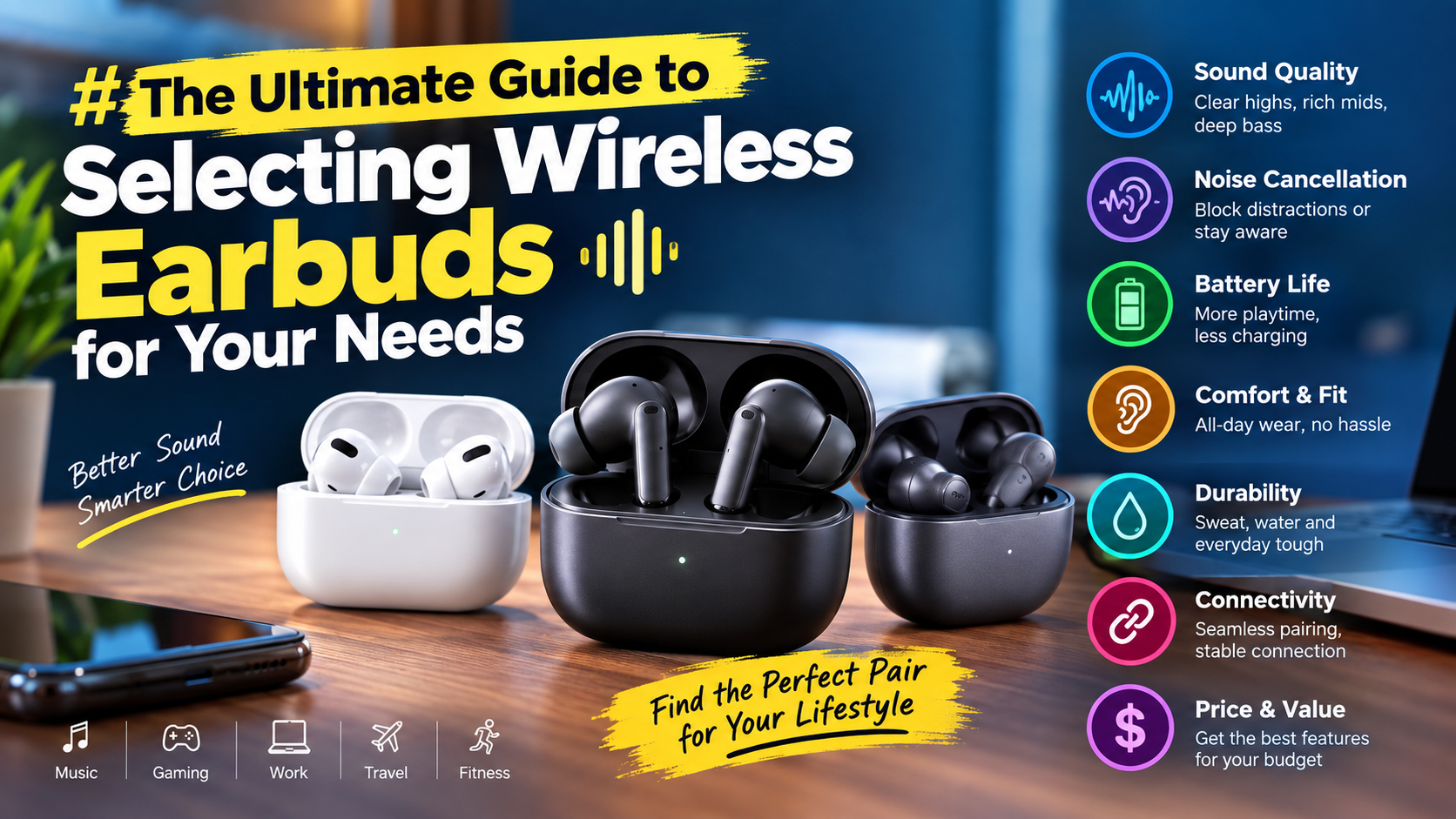
    How to Choose the Best Wireless Earbuds in Pakistan Complete Buying Guide

    Wireless earbuds have become a popular choice in Pakistan for listening to music, watching videos, making calls, attending online classes, and playing games. With so many options available, choosing the right pair can sometimes be confusing.

    Different wireless earbuds offer different features such as ANC, ENC, Bluetooth 5.3, Bluetooth 5.4, gaming modes, long battery life, and different types of sound profiles. A higher price or newer specification does not always mean that a pair of earbuds will be the right choice for you.

    If you are looking for the best wireless earbuds in Pakistan, the most important thing is to understand which features actually matter for your daily use. In this complete buying guide, we explain the main things you should check before buying wireless earbuds.

    1. Decide How You Will Use Your Earbuds

    Before comparing different wireless earbuds, first think about how you will use them. The best earbuds for gaming may not be the same as the best earbuds for phone calls or studying.

    For example, you may mainly use earbuds for:

    • Listening to music
    • Watching YouTube and movies
    • Making phone calls
    • Online classes and meetings
    • Gaming
    • Running and workouts
    • Travelling
    • Everyday use

    Once you know your main use, it becomes easier to decide which features should be your priority.

    2. Check the Sound Quality

    Sound quality is one of the most important things to consider when buying wireless earbuds. However, sound quality is not determined by one specification alone.

    Different earbuds can have different sound signatures. Some are designed to provide stronger bass, while others may focus more on vocals, clarity, or a balanced sound.

    If you enjoy music with strong bass, you may prefer earbuds with a bass-focused sound profile. If you frequently listen to podcasts, lectures, or videos, clear vocals may be more important.

    Do not choose earbuds only because they advertise a specific Bluetooth version. As explained in our guide to Bluetooth 5.3 vs 5.4, Bluetooth version alone does not determine overall audio quality.

    3. Understand ANC and ENC

    ANC and ENC are two features you will often see when shopping for wireless earbuds. Although both involve noise reduction, they are designed for different purposes.

    What Is ANC?

    ANC stands for Active Noise Cancellation. It uses microphones and electronic processing to reduce certain external sounds while you are listening to audio.

    ANC can be useful when travelling, working in a noisy environment, or listening to music in places with continuous background noise.

    What Is ENC?

    ENC stands for Environmental Noise Cancellation. It is commonly used to improve voice communication by helping reduce surrounding noise captured by microphones during calls.

    If you frequently make phone calls, attend online meetings, or use your earbuds for communication, ENC can be a useful feature.

    For example, the Toocki Bluetooth 5.4 Wireless Earbuds offer both ANC and ENC features.

    4. Choose the Right Bluetooth Version

    Bluetooth is responsible for the wireless connection between your earbuds and smartphone, laptop, or tablet.

    Modern earbuds can come with Bluetooth 5.3, Bluetooth 5.4, and other Bluetooth versions. Newer Bluetooth specifications can introduce improvements, but you should not assume that a higher number automatically means better earbuds.

    Bluetooth 5.3 can already provide a modern wireless connection for everyday activities. Bluetooth 5.4 is newer and offers additional capabilities.

    When buying earbuds, consider Bluetooth version along with sound quality, battery life, microphone performance, compatibility, and other features.

    5. Consider Battery Life

    Battery life is especially important if you use wireless earbuds throughout the day. Nobody wants to charge their earbuds repeatedly during work, study, travel, or entertainment.

    Manufacturers normally provide battery information for the earbuds and charging case. Keep in mind that actual battery life can vary depending on volume level, ANC usage, calls, audio processing, and other factors.

    When comparing earbuds, check both:

    • Earbud playback time
    • Total battery life with the charging case

    A charging case can provide additional charges when you are away from a power source.

    6. Check the Charging Port and Charging Features

    The charging method is another practical feature to consider. Many modern wireless earbuds use USB Type-C charging, while some older or specific models may use another charging connection.

    USB Type-C is convenient because it is widely used across modern smartphones, power banks, laptops, and other accessories.

    Before buying earbuds, check the charging port and make sure it fits your existing accessories and charging setup.

    7. Microphone Quality Matters for Calls

    If you frequently make phone calls, attend online meetings, or send voice messages, microphone quality should be one of your priorities.

    Earbuds with good microphones can provide clearer voice communication, while ENC can help reduce unwanted environmental noise depending on the product’s implementation.

    Do not assume that a pair of earbuds with excellent music quality will automatically have excellent call quality. Audio playback and microphone performance are separate parts of the product.

    The Lecoo EW322 Wireless Bluetooth Earbuds are one option to consider if call-focused features such as ENC are important to you.

    8. Gaming Earbuds Need Low Latency

    If you play mobile games, latency can be an important consideration.

    Latency refers to the delay between an action happening in a game and the corresponding sound reaching your ears. In competitive games, lower audio delay can make the experience more responsive.

    However, Bluetooth version alone does not guarantee low latency. When shopping for gaming earbuds, look for a dedicated gaming mode or low-latency mode if gaming is one of your main priorities.

    The ZORO ZX2 Wireless Earbuds are designed with gaming use in mind and feature Bluetooth 5.3 and ENC.

    9. Comfort and Fit Are Very Important

    Even the best-sounding earbuds can become uncomfortable if they do not fit properly in your ears.

    Comfort becomes especially important if you wear earbuds for several hours every day. The shape, size, weight, ear tips, and overall design can affect how comfortable they feel.

    A good fit can also help improve passive noise isolation and prevent the earbuds from falling out during normal movement.

    If you plan to use earbuds while walking, exercising, or travelling, make sure the design feels secure and comfortable.

    10. Check the Earbud Design

    Wireless earbuds come in different designs. Some have a stem-style design, while others use a compact in-ear shape.

    The right design depends on your personal preference. Some users prefer earbuds with stems because they are easier to handle, while others prefer a smaller design.

    There is no single design that is perfect for everyone. Comfort and fit should be more important than simply choosing the most popular design.

    11. Consider Your Budget

    One of the easiest ways to narrow down your choices is to decide your budget before shopping.

    Wireless earbuds are available at different price points in Pakistan. You can find budget-friendly options for basic listening as well as premium models with more advanced features.

    If your budget is limited, focus on the features that you actually need instead of paying extra for specifications you may never use.

    For example, a student who mainly needs earbuds for lectures, YouTube, and calls may not need every premium feature available. A gamer may instead want to prioritize low latency and microphone performance.

    12. Check Compatibility With Your Phone

    Before purchasing wireless earbuds, make sure they are compatible with your smartphone and other devices.

    Most modern Bluetooth earbuds can connect with smartphones, tablets, and laptops, but the available features can vary between devices.

    If you use Android, check Android compatibility and available features. If you use an iPhone, consider how the earbuds work with iOS and whether they provide the features you need.

    For Apple users looking for an Apple-branded option, you can check the Apple AirPods 2 (2nd Generation).

    13. Look at the Audio Codec Support

    Bluetooth version and Bluetooth audio codec are not the same thing.

    The Bluetooth version describes the Bluetooth specification supported by the device, while an audio codec is used to encode and transmit audio between compatible devices.

    If you are particularly interested in audio performance, checking supported codecs can be useful. However, both the smartphone and earbuds need to support the relevant codec for its benefits to be available.

    For most everyday users, sound tuning, drivers, comfort, microphone quality, and overall product quality can be more practical considerations than focusing only on codec specifications.

    14. Check the Charging Case

    The charging case is an important part of true wireless earbuds. It protects the earbuds and provides additional battery power when the earbuds are not being used.

    When choosing earbuds, check the size and design of the charging case as well as its battery capacity or advertised total playback time.

    A compact case can be easier to carry in a pocket, while a larger case may provide more battery capacity. Your choice depends on whether portability or longer battery life is more important to you.

    15. Think About Your Daily Environment

    Your environment can influence which earbuds are suitable for you.

    If you mainly use earbuds at home, basic noise isolation may be enough. If you travel frequently or spend time in busy environments, ANC can become more useful.

    If you frequently make calls in noisy places, microphone quality and ENC can be more important.

    If you study in quiet environments, comfortable earbuds with clear vocals may be more useful than advanced noise cancellation.

    This is why there is no single pair of earbuds that is perfect for every user.

    Best Wireless Earbuds for Music

    Music listeners should focus on sound quality, comfort, battery life, and the sound profile they prefer.

    If you enjoy bass-heavy music, look for earbuds designed to deliver stronger bass. If you prefer vocals and podcasts, focus on clarity and balanced audio.

    Also consider whether you want ANC. Active Noise Cancellation can help reduce external sounds and make it easier to focus on your music in suitable environments.

    Best Wireless Earbuds for Calls

    For calls, microphone performance should be one of your main priorities.

    Look for earbuds that offer good microphones and ENC or similar voice-processing features. The design should also fit securely and comfortably if you spend a lot of time on calls.

    The Lecoo EW322 is one example of wireless earbuds with ENC noise cancellation and HD sound.

    Best Wireless Earbuds for Gaming

    Gamers should pay attention to low latency, gaming mode, microphone performance, battery life, and comfort.

    A dedicated low-latency mode can be more relevant for gaming than simply choosing between Bluetooth 5.3 and Bluetooth 5.4.

    The ZORO ZX2 Wireless Earbuds are an option for users looking for Bluetooth 5.3 gaming earbuds with ENC.

    Best Wireless Earbuds for Everyday Use

    For everyday use, you do not necessarily need the most expensive earbuds. A good pair should provide reliable connectivity, comfortable fit, suitable battery life, clear audio, and acceptable call quality.

    Bluetooth 5.3 or Bluetooth 5.4 can both be suitable for daily use. Instead of focusing on one specification, compare the complete feature set and choose according to your needs.

    Why You Should Not Choose Earbuds Only by Bluetooth Version

    Bluetooth version is useful information, but it should not be the only thing you consider.

    For example, Bluetooth 5.4 does not automatically mean:

    • Better bass
    • Better vocals
    • Longer battery life
    • Better microphone quality
    • Lower gaming latency
    • Better ANC
    • More comfortable fit

    These features depend on the complete design and implementation of the earbuds.

    How to Compare Two Wireless Earbuds

    If you are comparing two different wireless earbuds, create a simple checklist based on your priorities.

    First, compare sound quality and features. Then check battery life, microphone quality, Bluetooth version, ANC or ENC, gaming features, comfort, charging, compatibility, and price.

    Do not automatically select the product with more specifications. Instead, select the product whose specifications are most relevant to your actual use.

    Wireless Earbuds Available at Techify

    Techify offers different wireless earbuds for different types of users and budgets.

    The Toocki Bluetooth 5.4 Wireless Earbuds are an option for users looking for Bluetooth 5.4 with ANC and ENC.

    The ZORO ZX2 Wireless Earbuds are aimed at users interested in gaming and feature Bluetooth 5.3 and ENC.

    The Lecoo EW322 Wireless Earbuds offer Bluetooth connectivity with ENC noise cancellation and HD sound.

    The GIONEE True Wireless Earbuds are another Bluetooth 5.4 option for everyday wireless listening.

    You can also explore the latest wireless earbuds and mobile accessories at Techify to compare different options.

    Frequently Asked Questions

    Which Bluetooth version is best for wireless earbuds?

    Bluetooth 5.3 and Bluetooth 5.4 are both modern options. The best choice depends on the complete features of the earbuds rather than Bluetooth version alone.

    Are Bluetooth 5.4 earbuds better than Bluetooth 5.3 earbuds?

    Bluetooth 5.4 is newer, but that does not automatically make every Bluetooth 5.4 earbud better than every Bluetooth 5.3 model. Sound, battery, microphones, comfort, and other features also matter.

    What is more important, ANC or ENC?

    It depends on your use. ANC is mainly useful for reducing external sounds while listening, while ENC is commonly used to improve voice communication during calls.

    Are wireless earbuds good for gaming?

    Yes. Wireless earbuds can be suitable for gaming, especially models that offer a dedicated gaming or low-latency mode. Check latency and microphone performance if gaming is important to you.

    How long should wireless earbuds battery last?

    Battery life varies between models and depends on factors such as volume, ANC usage, calls, and other features. Always check the advertised playback time for the specific earbuds you are considering.

    Do expensive wireless earbuds always sound better?

    Not necessarily. Price can reflect additional features, brand, design, or technology, but sound quality depends on the complete audio design and tuning of the earbuds.

    Should I buy earbuds with ANC?

    ANC can be useful if you frequently use earbuds in noisy environments or while travelling. If you mainly use earbuds in quiet places, you may not need ANC.

    What should I look for in earbuds for calls?

    Look for good microphone quality, ENC or other voice-processing features, comfortable fit, and reliable connectivity.

    What should I look for in gaming earbuds?

    For gaming, check low latency, gaming mode, microphone quality, battery life, comfort, and connectivity.

    Final Thoughts

    Choosing the best wireless earbuds in Pakistan is not simply about selecting the newest Bluetooth version or the most expensive product. The right earbuds depend on how you plan to use them and which features are important to you.

    For music, focus on sound quality and comfort. For calls, pay attention to microphone performance and ENC. For gaming, look for low latency and a gaming mode. For travel and noisy environments, ANC can be useful. For everyday use, reliable connectivity, battery life, and comfortable fit are important.

    Bluetooth 5.3 and Bluetooth 5.4 can both provide a modern wireless experience. Instead of choosing earbuds based on one specification, compare the complete product and select the option that fits your requirements and budget.

    At Techify, you can explore different wireless earbuds and mobile accessories and choose an option based on your preferred features, usage, and budget.

  • Bluetooth 5.3 vs 5.4: What Is the Difference in Wireless Earbuds?

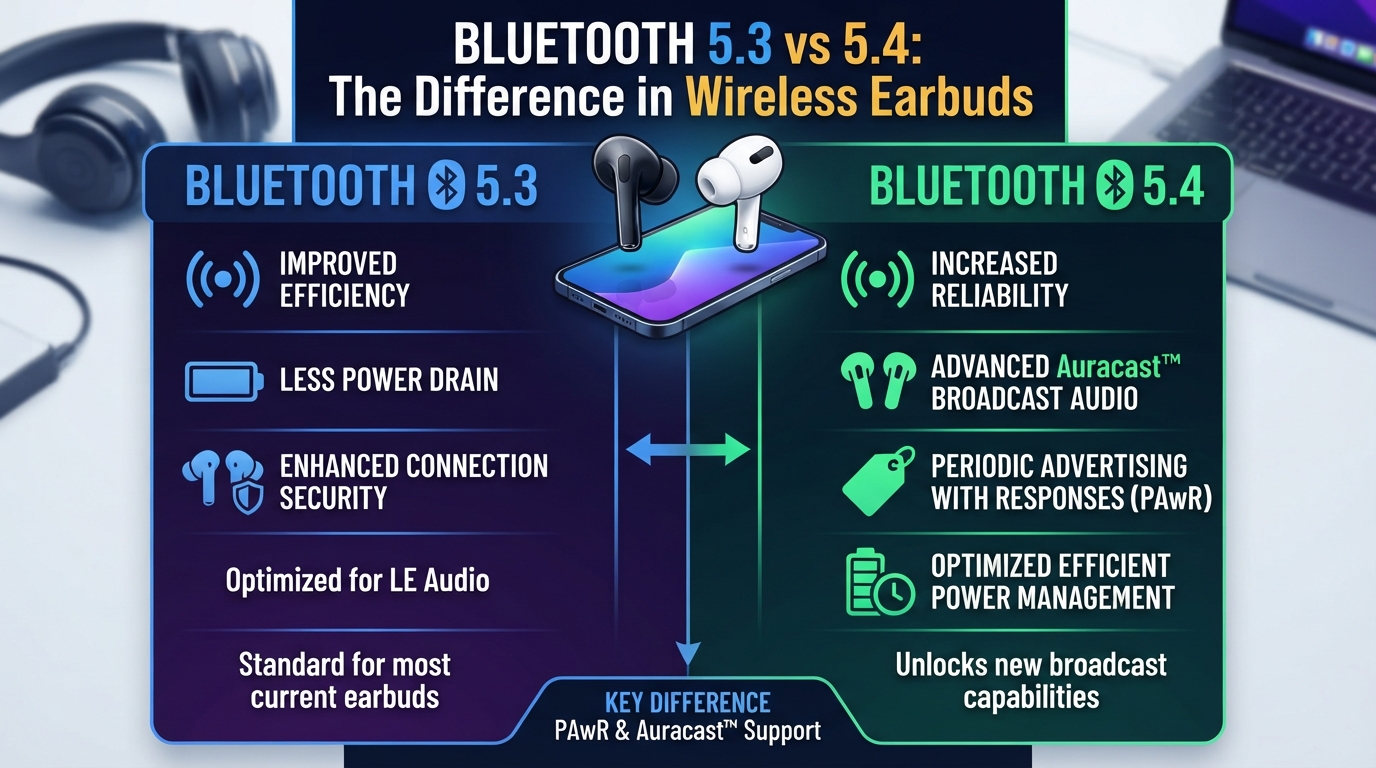
    Bluetooth 5.3 vs 5.4: What Is the Difference in Wireless Earbuds?

    When buying wireless earbuds, you will often see specifications such as Bluetooth 5.3, Bluetooth 5.4, ANC, ENC, low latency, and long battery life. Bluetooth version is one of the first specifications many buyers notice, especially when comparing newer earbuds. But is Bluetooth 5.4 actually better than Bluetooth 5.3 for everyday use?

    If you are searching for the best wireless earbuds in Pakistan, understanding the difference between Bluetooth 5.3 and Bluetooth 5.4 can help you make a more informed decision. The newer Bluetooth number does not automatically mean better sound, stronger bass, or lower gaming latency. The complete hardware and software implementation of the earbuds matters as well.

    In this guide, we will explain Bluetooth 5.3 vs 5.4 in simple terms, discuss connectivity, battery efficiency, sound quality, gaming, calls, compatibility, and explain what you should actually look for when buying wireless earbuds.

    What Is Bluetooth?

    Bluetooth is a wireless communication technology that allows devices to connect and exchange information over short distances without using cables. Smartphones, laptops, tablets, smartwatches, speakers, headphones, and wireless earbuds commonly use Bluetooth.

    For wireless earbuds, Bluetooth is responsible for creating the wireless connection between your phone and the earbuds. Your smartphone sends audio information through Bluetooth, and the earbuds receive that information and convert it into sound.

    Bluetooth technology has continued to improve over the years. Newer versions can introduce improvements to power efficiency, communication, reliability, and additional features. Bluetooth 5.3 and Bluetooth 5.4 are two relatively recent versions that you may find in modern wireless earbuds.

    What Is Bluetooth 5.3?

    Bluetooth 5.3 is a newer generation of Bluetooth technology designed to improve wireless communication and efficiency. It includes improvements related to connection management and power consumption compared with previous generations.

    For wireless earbuds, Bluetooth 5.3 can provide a modern and reliable wireless connection when paired with a compatible smartphone or other device.

    Bluetooth 5.3 earbuds are suitable for many common activities, including:

    • Listening to music
    • Watching YouTube videos
    • Watching movies and TV shows
    • Making phone calls
    • Online meetings
    • Playing mobile games
    • Listening to podcasts
    • Everyday wireless listening

    One important point is that the Bluetooth version is not the only factor responsible for the performance of earbuds. Two different Bluetooth 5.3 earbuds can provide very different experiences depending on their drivers, microphones, codecs, battery, firmware, and overall design.

    What Is Bluetooth 5.4?

    Bluetooth 5.4 is a newer Bluetooth specification that introduces additional capabilities and improvements over previous Bluetooth versions. It was designed to support more advanced Bluetooth communication and additional use cases.

    When you see Bluetooth 5.4 wireless earbuds, it means that the earbuds use hardware that supports the Bluetooth 5.4 specification. However, this does not mean that every feature associated with Bluetooth 5.4 will necessarily be important or noticeable when you are simply listening to music.

    For normal earbud users, Bluetooth 5.4 can provide a modern wireless connection, but the real-world experience still depends on the implementation by the earbud manufacturer and the smartphone or device being used.

    Bluetooth 5.3 vs 5.4: What Is the Main Difference?

    The biggest difference between Bluetooth 5.3 and Bluetooth 5.4 is that Bluetooth 5.4 is a newer specification with additional features and improvements. Bluetooth 5.3 already provides a modern wireless connection, while Bluetooth 5.4 adds newer capabilities.

    For the average wireless earbud user, however, the difference may not be dramatic. If you use earbuds mainly for music, calls, videos, and casual gaming, both versions can provide a good experience.

    Here are some important points to understand:

    • Bluetooth 5.3: A modern Bluetooth version suitable for everyday wireless earbuds.
    • Bluetooth 5.4: A newer Bluetooth specification with additional capabilities.
    • Sound quality: Bluetooth version alone does not determine sound quality.
    • Gaming latency: Bluetooth version alone does not guarantee low latency.
    • Call quality: Microphone quality and ENC implementation are important.
    • Battery life: Bluetooth efficiency can contribute, but battery capacity and overall design also matter.
    • Compatibility: The phone and earbuds need to work together properly for the available features.

    Does Bluetooth 5.4 Give Better Sound Quality?

    This is one of the most common questions when comparing Bluetooth 5.3 vs 5.4. The short answer is that Bluetooth 5.4 does not automatically mean better sound quality.

    Audio quality depends on several different components. The speaker drivers inside the earbuds, audio tuning, supported Bluetooth audio codecs, amplifier, digital signal processing, and quality of the original audio all affect what you hear.

    For example, a well-tuned pair of Bluetooth 5.3 earbuds can sound better than a poorly tuned pair of Bluetooth 5.4 earbuds. This is why you should not choose earbuds based only on the Bluetooth number printed on the product box.

    If music quality is your main priority, look at the complete audio specification and product design instead of focusing only on Bluetooth 5.3 or Bluetooth 5.4.

    Bluetooth 5.3 vs 5.4 for Gaming

    Gaming is another area where buyers often assume that a newer Bluetooth version automatically means lower latency. That is not necessarily the case.

    Latency is the delay between an action happening on your phone and the corresponding sound reaching your ears. In competitive games, even a noticeable delay can affect the experience.

    Gaming latency can depend on the earbuds, Bluetooth implementation, audio codec, smartphone, game, and whether the earbuds provide a dedicated gaming or low-latency mode.

    For example, the ZORO ZX2 Wireless Earbuds use Bluetooth 5.3 and are positioned as gaming earbuds. This shows why you should consider the complete feature set instead of assuming that Bluetooth 5.4 automatically makes earbuds better for gaming.

    Is Bluetooth 5.4 Better for Gaming?

    Bluetooth 5.4 is newer, but the Bluetooth version by itself does not guarantee lower gaming latency.

    If you are buying earbuds mainly for gaming, check whether the product specifically mentions a gaming mode or low-latency feature. You should also consider microphone performance, comfort, battery life, and how well the earbuds fit your ears during longer gaming sessions.

    For casual gaming, both Bluetooth 5.3 and Bluetooth 5.4 earbuds can be suitable. For competitive gaming, the complete low-latency implementation is more important than simply choosing the higher Bluetooth number.

    Bluetooth 5.3 vs 5.4 for Phone Calls

    Bluetooth version is also not the only factor that determines call quality.

    If you frequently make calls using wireless earbuds, microphone quality is extremely important. Technologies such as ENC can help improve voice capture by reducing unwanted environmental noise during calls, depending on how the feature is implemented.

    The Lecoo EW322 Wireless Earbuds are an example of earbuds that feature ENC noise cancellation and HD sound.

    When choosing earbuds for calls, also consider the number and quality of microphones, microphone placement, noise processing, and how well the earbuds perform in noisy environments.

    Bluetooth 5.3 vs 5.4 and Battery Life

    Battery life is another specification that buyers should consider when choosing wireless earbuds.

    Bluetooth technology includes improvements that can help devices operate efficiently, but you should not assume that Bluetooth 5.4 earbuds will always have longer battery life than Bluetooth 5.3 earbuds.

    Actual battery life can depend on:

    • Earbud battery capacity
    • Charging case capacity
    • Volume level
    • ANC usage
    • Calling and microphone usage
    • Audio processing
    • Bluetooth implementation
    • Firmware and software optimization
    • Overall earbud design

    For this reason, always check the advertised battery information for the specific earbuds you are considering instead of judging battery life from the Bluetooth version alone.

    Bluetooth 5.3 vs 5.4 Connection Stability

    A stable connection is important because nobody wants their earbuds to disconnect repeatedly while listening to music or making a call.

    Both Bluetooth 5.3 and Bluetooth 5.4 are modern Bluetooth specifications. However, real-world connection stability can depend on the quality of the Bluetooth hardware, antenna design, firmware, smartphone, physical surroundings, and interference from other wireless devices.

    This means two earbuds with the same Bluetooth version may not necessarily have identical connection performance.

    If connection reliability is important to you, consider the reputation and overall design of the product rather than choosing only according to the Bluetooth version.

    Does Your Phone Need Bluetooth 5.4?

    You do not necessarily need a phone with Bluetooth 5.4 just to use Bluetooth 5.4 earbuds. Bluetooth devices are generally designed to maintain compatibility across different Bluetooth versions, although the exact features available can depend on the devices involved.

    For example, if your smartphone has an older Bluetooth version, you can still be able to connect compatible wireless earbuds. However, you may not get every feature associated with a newer Bluetooth specification.

    This is why it is important to consider both sides of the connection: your smartphone and the earbuds.

    Bluetooth Version vs Bluetooth Codec

    Many people confuse Bluetooth version with Bluetooth codec, but they are not the same thing.

    The Bluetooth version describes the Bluetooth specification supported by the device. A codec, on the other hand, determines how audio data is encoded and transmitted between compatible devices.

    For audio users, codec support can be particularly relevant when considering sound quality and audio transmission. However, the actual benefit depends on whether both the smartphone and earbuds support the same codec and how the manufacturer implements it.

    This is another reason why simply seeing Bluetooth 5.4 on a product specification is not enough to determine its overall audio performance.

    What About ANC and ENC?

    ANC and ENC are separate technologies from the Bluetooth version.

    ANC stands for Active Noise Cancellation. It is designed to reduce certain external sounds by using microphones and electronic processing.

    ENC stands for Environmental Noise Cancellation. It is commonly used to improve voice communication by helping reduce surrounding noise captured by microphones during calls.

    So, if a pair of earbuds has Bluetooth 5.4, that does not automatically mean it has ANC or ENC. These are separate features and should be checked in the product specifications.

    The Toocki Bluetooth 5.4 Wireless Earbuds are an example of a product that combines Bluetooth 5.4 with both ANC and ENC features.

    Bluetooth 5.3 vs 5.4 for Students

    For students, wireless earbuds are commonly used for online lectures, YouTube videos, music, calls, and studying. In these situations, you usually do not need to choose earbuds simply because they have the newest Bluetooth version.

    Instead, look for comfortable earbuds with reliable connectivity, suitable battery life, good call quality, and sound that matches your preferences.

    If your budget is limited, a good Bluetooth 5.3 model may provide everything you need. Spending more simply to move from Bluetooth 5.3 to Bluetooth 5.4 may not provide a noticeable improvement for basic daily use.

    Bluetooth 5.3 vs 5.4 for iPhone Users

    iPhone users can also use wireless earbuds with different Bluetooth versions. When selecting earbuds, compatibility with the phone is more important than simply choosing the newest Bluetooth specification.

    If you use an iPhone, also consider the type of audio features you need, call quality, comfort, battery life, and the overall quality of the earbuds.

    For users looking for an Apple-style wireless earbud option, you can also check the Apple AirPods 2 (2nd Generation).

    Bluetooth 5.3 vs 5.4: Which One Should You Buy?

    There is no need to choose earbuds only because the product has the higher Bluetooth number.

    If you find a Bluetooth 5.3 pair with the sound quality, battery life, microphone performance, comfort, and features you need, it can be a suitable choice. Bluetooth 5.4 can be a good option if you want a newer Bluetooth specification and the earbuds provide the other features you are looking for.

    Before buying wireless earbuds, consider these factors:

    • Sound quality: Check the drivers, tuning, and supported audio features.
    • Call quality: Look for good microphones and ENC if calls are important.
    • Battery life: Check the advertised earbud and charging case battery performance.
    • Gaming: Look for a dedicated gaming or low-latency mode if required.
    • Comfort: Choose a design that fits comfortably for extended use.
    • Noise cancellation: Consider ANC for listening and ENC for calls when needed.
    • Connectivity: Bluetooth 5.3 and 5.4 are both modern options.
    • Compatibility: Make sure the earbuds work properly with your smartphone and other devices.
    • Price: Compare the complete feature set instead of paying only for a newer Bluetooth number.

    Bluetooth 5.4 Wireless Earbuds at Techify

    If you specifically want Bluetooth 5.4 earbuds, the Toocki Bluetooth 5.4 Wireless Earbuds are one option available at Techify. They feature Bluetooth 5.4 along with ANC and ENC noise cancellation.

    These features can make them relevant for users who want a combination of modern Bluetooth connectivity and noise cancellation features.

    Bluetooth 5.3 Wireless Earbuds at Techify

    If Bluetooth 5.3 is enough for your requirements, there are also several options available.

    The ZORO ZX2 Wireless Earbuds feature Bluetooth 5.3, ENC, and gaming-focused features. They can be considered by users who want wireless earbuds for gaming and everyday entertainment.

    Another option is the GIONEE True Wireless Earbuds, which feature Bluetooth 5.4 and are designed for everyday wireless listening.

    Bluetooth 5.3 vs 5.4: Common Buying Mistakes

    Choosing only based on the Bluetooth number

    One of the most common mistakes is assuming that Bluetooth 5.4 automatically means better earbuds. The Bluetooth version is only one part of the product specification.

    Ignoring microphone quality

    If you make frequent calls, a good microphone can be more important to your daily experience than the difference between Bluetooth 5.3 and 5.4.

    Ignoring comfort

    Even earbuds with excellent specifications can become difficult to use if they do not fit comfortably. Always consider the shape and fit of the earbuds.

    Assuming Bluetooth version controls gaming latency

    Bluetooth version alone does not guarantee low latency. Look for a dedicated low-latency or gaming mode when gaming performance is important.

    Ignoring the smartphone

    Your smartphone is an important part of the wireless connection. Check compatibility and supported features before buying.

    Frequently Asked Questions

    Is Bluetooth 5.4 better than Bluetooth 5.3?

    Bluetooth 5.4 is a newer specification and introduces additional capabilities, but this does not mean that every Bluetooth 5.4 earbud will perform better than every Bluetooth 5.3 earbud.

    Does Bluetooth 5.4 improve sound quality?

    Not automatically. Sound quality depends on factors such as drivers, tuning, codecs, audio processing, and overall earbud design.

    Is Bluetooth 5.3 still good for wireless earbuds?

    Yes. Bluetooth 5.3 is a modern Bluetooth specification and can provide a reliable connection for music, calls, videos, and gaming.

    Does Bluetooth 5.4 have lower latency?

    The Bluetooth version alone does not guarantee lower latency. Latency depends on the complete wireless and audio implementation, including the codec, earbuds, smartphone, and software.

    Can Bluetooth 5.4 earbuds work with older phones?

    Bluetooth devices are generally designed to maintain compatibility across Bluetooth versions, but the features available can depend on the Bluetooth capabilities of both devices.

    Should I buy Bluetooth 5.3 or Bluetooth 5.4 earbuds?

    Both can be suitable choices. Compare the complete specifications, including sound quality, microphone performance, battery life, comfort, ANC or ENC, gaming features, compatibility, and price.

    Is Bluetooth 5.4 better for calls?

    Not necessarily. Call quality depends heavily on the microphones and voice-processing technology used by the earbuds. ENC can also be useful for voice communication.

    Is Bluetooth 5.4 better for gaming?

    Not automatically. If gaming is your priority, look for earbuds that specifically offer a gaming or low-latency mode rather than choosing based only on Bluetooth version.

    Final Thoughts

    Bluetooth 5.3 and Bluetooth 5.4 are both modern options for wireless earbuds. Bluetooth 5.4 is newer and introduces additional capabilities, but the difference may not be significant for every everyday user.

    If your main activities are listening to music, watching videos, making calls, and casual gaming, a good pair of Bluetooth 5.3 earbuds can still provide a reliable wireless experience. If you want a newer Bluetooth specification and find a Bluetooth 5.4 model with the features you need, it can also be a suitable choice.

    The most important thing is to look beyond the Bluetooth number. Sound quality, microphone performance, battery life, comfort, ANC, ENC, gaming features, compatibility, and price all contribute to the overall value of wireless earbuds.

    Whether you choose Bluetooth 5.3 or Bluetooth 5.4, the right earbuds are the ones that match your actual requirements and provide the features you will use every day.

    Explore more wireless earbuds and mobile accessories at Techify and compare different options based on your budget and requirements.

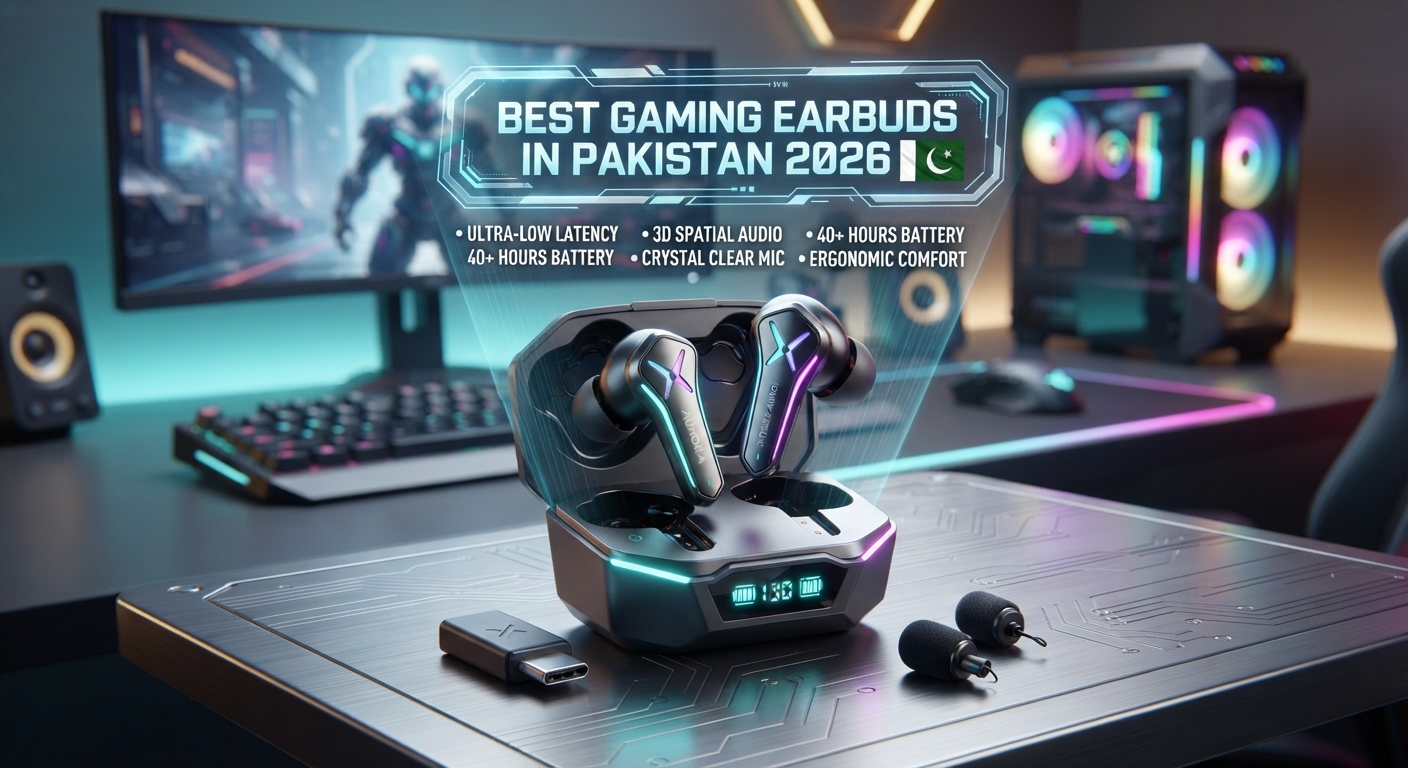
  • Best Gaming Earbuds in Pakistan 2026

    Best Gaming Earbuds in Pakistan 2026

    Wireless earbuds have become a popular choice for mobile and casual gaming because they are lightweight, portable and easy to use. However, choosing the right gaming earbuds is not only about sound quality. Features such as low latency, microphone quality, Bluetooth connectivity and battery life can make a noticeable difference during gaming.

    In this guide, we’ll look at important features to consider when choosing the best gaming earbuds in Pakistan in 2026 and explore some affordable options available on Techify.

    What Makes Good Gaming Earbuds?

    Gaming earbuds should provide a combination of stable connectivity, clear game audio and good microphone performance. For competitive games, latency is also an important factor because audio should reach your ears as quickly as possible.

    Low Latency

    Low latency helps reduce the delay between an action happening in a game and the sound reaching your ears. This can be particularly useful in fast-paced games where audio cues are important.

    Good Microphone

    If you play multiplayer games, microphone quality is important for communicating with teammates. Features such as ENC can help reduce environmental noise picked up by the microphones.

    Stable Bluetooth Connection

    A stable wireless connection is important during gaming. Bluetooth versions such as 5.2, 5.3 and 5.4 are commonly found in modern wireless earbuds.

    Battery Life

    Gaming can quickly consume battery power, so a longer battery life can be useful if you regularly play for extended sessions.

    ZORO ZX2 Gaming Earbuds

    The ZORO ZX2 Wireless Gaming Earbuds are designed with gaming and entertainment in mind. They feature Bluetooth 5.3 and ENC and offer up to 100 hours of advertised playtime.

    The long advertised battery life can be useful for gamers who want to spend less time charging their earbuds.

    • Bluetooth 5.3
    • ENC noise cancellation
    • Gaming-focused design
    • Up to 100 hours advertised playtime
    • Wireless TWS connectivity

    Best for: Mobile gaming, entertainment and users who prioritize battery life.

    View ZORO ZX2 Gaming Earbuds on Techify

    Toocki Bluetooth 5.4 Earbuds

    The Toocki Bluetooth 5.4 Wireless Earbuds offer both ANC and ENC. ANC can help reduce surrounding noise while gaming, while ENC is mainly focused on microphone performance during calls and voice communication.

    • Bluetooth 5.4
    • ANC
    • ENC
    • Wireless TWS design
    • Suitable for gaming and entertainment

    Best for: Gamers who also want noise cancellation for everyday listening.

    View Toocki Bluetooth 5.4 Earbuds on Techify

    Gaming Earbuds vs Gaming Headsets

    Gaming earbuds are generally smaller and easier to carry than traditional gaming headsets. They can also be more comfortable for users who do not like wearing large headphones.

    Gaming headsets, on the other hand, can offer larger drivers, dedicated microphones and features designed specifically for PC and console gaming.

    For mobile gaming and everyday use, wireless earbuds can be a convenient option.

    Are Wireless Earbuds Good for Gaming?

    Yes, wireless earbuds can be suitable for gaming, especially on smartphones. However, gamers should check latency, microphone performance and connectivity before buying.

    For competitive gaming, even small delays can matter, so a model with a dedicated low-latency or gaming mode can be preferable when available.

    How to Choose Gaming Earbuds in Pakistan

    • Check latency or gaming mode features
    • Look for stable Bluetooth connectivity
    • Consider microphone quality
    • Check battery life
    • Choose a comfortable fit
    • Consider ANC if you play in noisy environments

    Final Thoughts

    The best gaming earbuds in Pakistan depend on your gaming style and requirements. If battery life and gaming-focused features are important, the ZORO ZX2 is an option to consider. If you also want ANC and ENC for gaming, calls and everyday listening, the Toocki Bluetooth 5.4 earbuds are another option.

    Always check the latest specifications, price and availability before ordering.

    Explore Wireless Earbuds on Techify

    Frequently Asked Questions

    Which earbuds are good for gaming in Pakistan?

    Gaming-focused options such as the ZORO ZX2 can be considered for mobile gaming. Look for low latency, stable connectivity, good microphone performance and sufficient battery life.

    Are wireless earbuds good for PUBG and other mobile games?

    Wireless earbuds can be used for mobile gaming, but latency varies between models. Gamers should look for earbuds with low-latency or gaming modes when available.

    Is ENC useful for gaming?

    ENC can be useful when communicating with teammates because it is designed to improve microphone voice pickup in environments with background noise.

    Is ANC useful for gaming?

    ANC can help reduce surrounding noise while gaming, allowing you to focus more on game audio.

  • ANC vs ENC: What Is the Difference and Which One Do You Need?

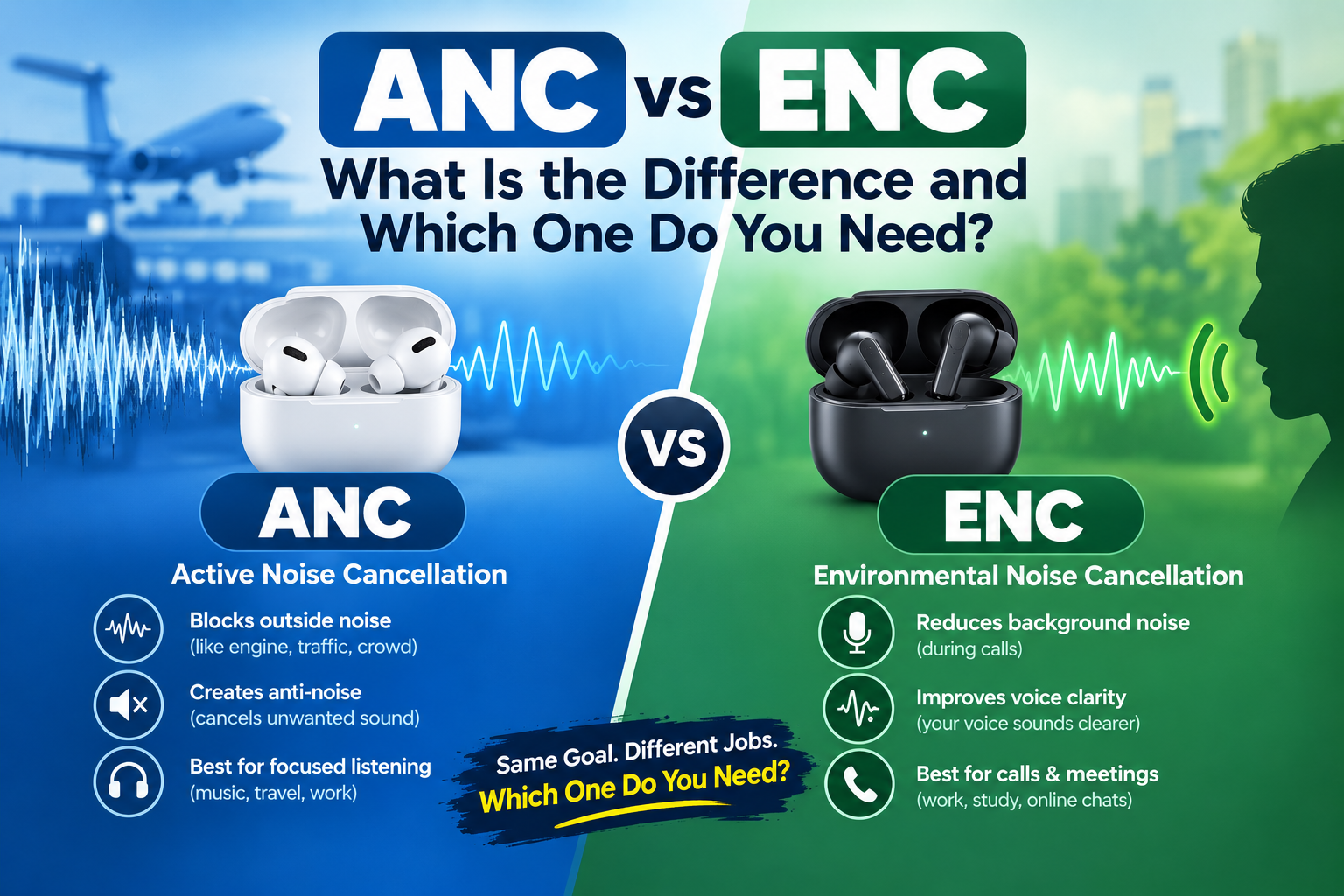
    ANC vs ENC: What Is the Difference and Which One Do You Need?

    When buying wireless earbuds, you will often see terms like ANC and ENC in the product specifications. Both technologies are designed to deal with unwanted noise, but they work differently and are made for different purposes.

    Understanding the difference between ANC vs ENC can help you choose the right wireless earbuds for music, gaming, calls and everyday use.

    What Is ANC?

    ANC stands for Active Noise Cancellation. It is a technology designed to reduce unwanted sounds around you while you are listening to music, watching videos or using your earbuds. ANC uses microphones to detect surrounding sounds and generates an opposing signal to help reduce those sounds. This can make it easier to focus on your audio in noisy environments. ANC can be particularly useful when travelling, working in busy places or listening to music around background noise.

    Benefits of ANC

    • Helps reduce surrounding background noise
    • Useful for music and video watching
    • Can make listening more comfortable in noisy environments
    • Useful during travel and commuting
    • Available in many modern wireless earbuds

    What Is ENC?

    ENC stands for Environmental Noise Cancellation. It is mainly focused on improving voice communication during phone calls and voice chats.

    ENC uses microphones to detect environmental sounds and helps separate your voice from surrounding background noise. This can help the person on the other end hear your voice more clearly.

    ENC can be useful when making calls from places where there is background noise, such as offices, streets or busy public areas.

    Benefits of ENC

    • Helps improve voice clarity during calls
    • Reduces the effect of surrounding environmental noise on the microphone
    • Useful for phone calls and voice chats
    • Helpful for online meetings and classes
    • Common in budget and premium wireless earbuds

    ANC vs ENC: What Is the Main Difference?

    The simplest way to understand the difference is that ANC focuses on what you hear, while ENC mainly focuses on what the other person hears from your microphone. For example, if you are sitting in a noisy room and want to reduce the noise while listening to music, ANC is the technology you should look for. If you are making a phone call and want your voice to be clearer for the person you are talking to, ENC can be helpful.

    Does ANC Improve Call Quality?

    ANC and call microphone quality are not the same thing. ANC is primarily designed to reduce noise that reaches your ears while listening. For clearer calls, you should pay attention to the earbuds’ microphone system and features such as ENC. Some wireless earbuds include both ANC and ENC, giving users noise reduction for listening as well as features designed to improve voice communication.

    Does ENC Reduce Noise for You?

    ENC is mainly designed around microphone performance rather than reducing the noise you personally hear.

    If you want to reduce background noise while listening to music, ANC is generally the feature you should look for.

    Which Is Better: ANC or ENC?

    ANC and ENC are designed for different purposes, so one is not simply better than the other.

    If your priority is music, videos and reducing surrounding noise, ANC can be more useful.

    If your priority is phone calls, voice chats and clearer communication, ENC can be more useful.

    If you want both types of functionality, you can choose earbuds that offer both ANC and ENC.

    ANC and ENC for Gaming

    Gamers can benefit from both technologies depending on how they use their earbuds.

    ANC can help reduce surrounding noise while playing games, allowing you to focus more on the audio. ENC can be useful when communicating with teammates through voice chat because it is designed to improve microphone performance in noisy environments.

    For gaming, you should also consider low latency, Bluetooth connectivity, microphone quality and battery life rather than choosing earbuds based only on ANC or ENC.

    ANC and ENC for Phone Calls

    If you frequently use wireless earbuds for phone calls, ENC can be an important feature to consider. ENC is designed to help reduce environmental noise picked up by the microphones, which can make your voice easier to hear in noisy surroundings.

    However, actual call quality can vary depending on the microphone design, software processing, environment and the quality of the connection.

    Wireless Earbuds with Both ANC and ENC

    Some wireless earbuds provide both technologies in the same product.

    For example, the Toocki Bluetooth 5.4 Wireless Earbuds available on Techify feature both ANC and ENC, making them an option for users who want noise cancellation while listening as well as improved microphone performance for calls.

    Check Toocki Bluetooth 5.4 Wireless Earbuds on Techify

    How to Choose Between ANC and ENC

    Before buying wireless earbuds, think about how you use them most often.

    Choose ANC If:

    • You listen to music in noisy places
    • You travel frequently
    • You want to reduce surrounding noise while listening
    • You watch videos in busy environments
    • You want a more isolated listening experience

    Choose ENC If:

    • You make frequent phone calls
    • You attend online meetings or classes
    • You use voice chat while gaming
    • You often talk in noisy environments
    • Clear microphone communication is important to you

    Choose Both If:

    • You want noise reduction while listening
    • You also make frequent calls
    • You use earbuds for both entertainment and communication
    • You want a more complete set of noise-related features

    ANC Earbuds Available on Techify

    If you are looking for affordable wireless earbuds with ANC, you can check the Toocki Bluetooth 5.4 Wireless Earbuds with ANC and ENC.

    View Toocki Bluetooth 5.4 ANC + ENC Earbuds

    ENC Earbuds Available on Techify

    Techify also offers several wireless earbuds with ENC for users who are mainly interested in clearer calls and everyday communication.

    View Lecoo EW322 Wireless Earbuds with ENC

    View ZORO ZX2 Gaming Earbuds with ENC

    Are ANC Earbuds Worth Buying?

    ANC earbuds can be worth considering if you regularly use earbuds in noisy environments. They can help reduce unwanted background sounds and make listening more comfortable.

    However, ANC performance differs between earbuds. The number of microphones, hardware, software processing, earbud fit and design can all affect the actual result.

    Are ENC Earbuds Worth Buying?

    ENC earbuds can be useful if you frequently make calls or use voice chat. They are particularly helpful for people who need better microphone performance in environments with background noise.

    As with ANC, ENC performance can vary between different earbuds, so it is important to consider the overall microphone quality rather than relying on the ENC label alone.

    Final Thoughts

    The difference between ANC and ENC is simple once you understand their main purposes.

    ANC is primarily designed to reduce surrounding noise that you hear while listening to audio, while ENC is mainly designed to improve microphone voice pickup during calls and voice communication.

    If you mainly listen to music or watch videos in noisy environments, look for earbuds with ANC.

    If you frequently make calls or use voice chat, ENC can be an important feature.

    And if you want both, choosing wireless earbuds with ANC + ENC can give you a combination of both features.

    Explore more wireless earbuds on Techify to find an option that fits your needs and budget.

    Frequently Asked Questions

    What is the difference between ANC and ENC?

    ANC is primarily designed to reduce external noise that you hear while listening, while ENC is mainly designed to improve microphone performance during calls by reducing the effect of environmental noise.

    Is ANC better than ENC?

    Neither technology is simply better because they serve different purposes. ANC is useful for reducing noise while listening, while ENC is useful for clearer voice communication.

    Can earbuds have both ANC and ENC?

    Yes. Many wireless earbuds offer both ANC and ENC. These earbuds can provide noise reduction for listening as well as microphone-focused noise reduction for calls.

    Is ENC good for phone calls?

    Yes. ENC is designed to help reduce environmental noise picked up by the microphones, which can help make your voice clearer during calls.

    Is ANC good for gaming?

    ANC can help reduce surrounding noise while gaming. However, gamers should also consider latency, connectivity, microphone quality and battery life.

    Which is better for music, ANC or ENC?

    ANC is generally the more relevant feature for music because it is designed to reduce surrounding noise that you hear while listening.

  • 10000mAh Power Bank 22.5W vs 15W: Which ROMOSS Power Bank Is Better?

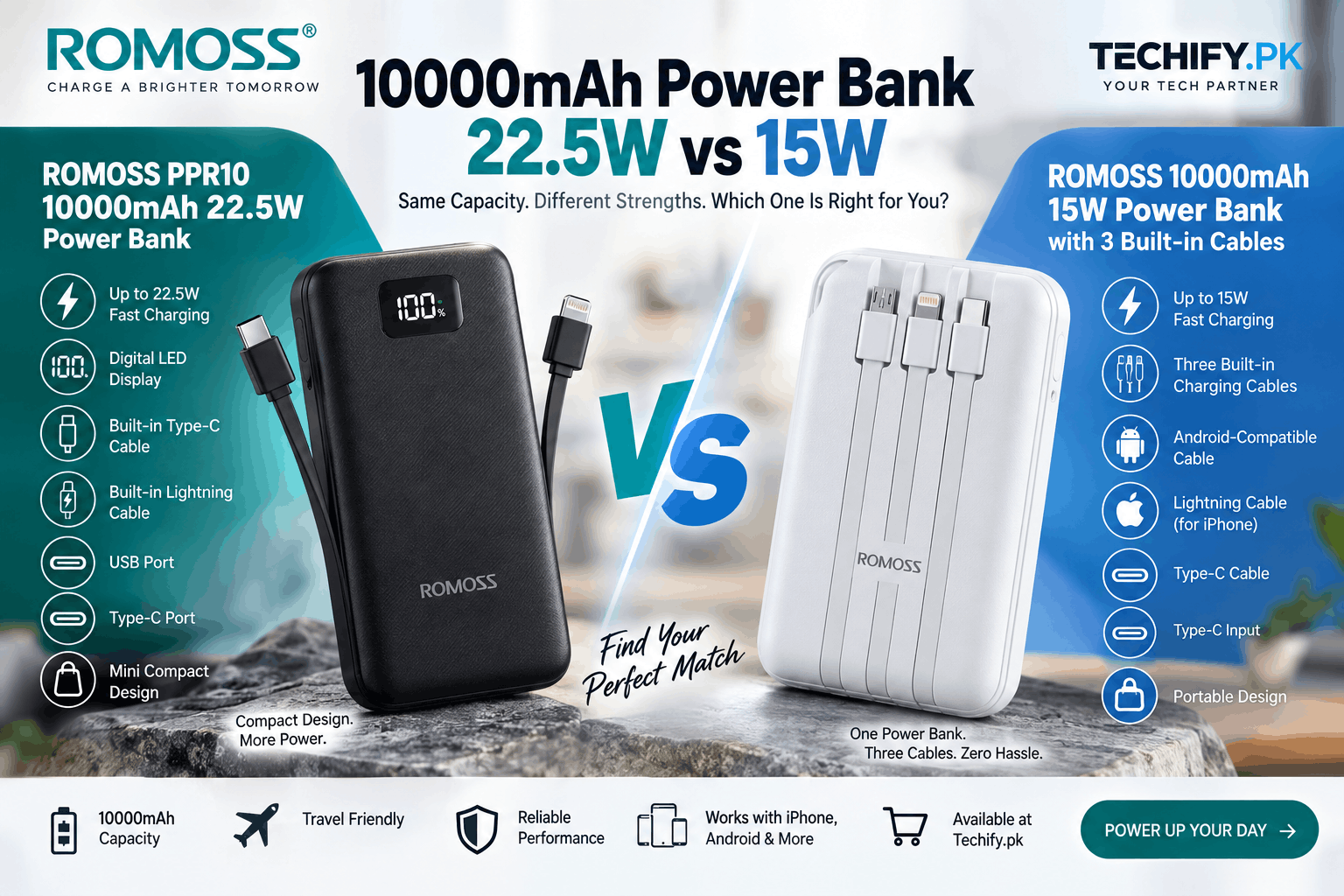
    10000mAh Power Bank 22.5W vs 15W: Which ROMOSS Power Bank Is Better?

    Choosing the right 10000mAh power bank in Pakistan can be confusing when different models offer different charging speeds and features. Two popular options from ROMOSS are the ROMOSS PPR10 10000mAh 22.5W Power Bank and the ROMOSS 10000mAh 15W Power Bank with 3 Built-in Cables.

    Both power banks have a 10000mAh battery capacity, but they are designed for different types of users. The ROMOSS PPR10 focuses on higher charging output, compact design and a digital LED display, while the 15W ROMOSS model focuses on convenience with three built-in charging cables.

    In this guide, we compare 22.5W vs 15W power banks, explain the difference in charging speed, compare their features, and help you choose the right ROMOSS power bank for your iPhone, Android or Type-C device in Pakistan.

    Quick Answer: 22.5W vs 15W Power Bank

    If you want a simple answer, the ROMOSS PPR10 22.5W is the better choice if your priority is higher charging output and a digital battery display.

    The ROMOSS 15W power bank with 3 built-in cables is a better fit if your priority is convenience and you do not want to carry separate charging cables.

    FeatureROMOSS PPR10 22.5WROMOSS 15W 3-Cable
    Battery Capacity10000mAh10000mAh
    Maximum Output22.5W15W
    DisplayDigital LED DisplayNo digital display
    Built-in CablesType-C & Lightning3 built-in cables
    PortsUSB & Type-CType-C input
    Best ForHigher charging outputEveryday convenience

    What Does 10000mAh Mean in a Power Bank?

    The 10000mAh rating represents the rated battery capacity of the power bank. It is one of the most popular capacities for portable power banks because it provides a useful balance between battery backup and portability.

    A 10000mAh power bank is suitable for keeping a smartphone powered during work, university, travel, commuting or situations where you do not have immediate access to a wall charger.

    However, a 10000mAh power bank will not transfer exactly 10000mAh to your phone. Some energy is lost during voltage conversion and the charging process. The actual amount of energy delivered to your smartphone depends on several factors, including conversion efficiency, cable quality and the phone’s battery.

    What Is the Difference Between 22.5W and 15W?

    The biggest difference between these two ROMOSS power banks is their maximum charging output.

    A 15W power bank can provide up to 15 watts under supported conditions, while a 22.5W power bank can provide up to 22.5 watts when the connected device and charging protocol support the required output.

    In simple terms:

    • 15W: Standard fast charging for compatible smartphones.
    • 22.5W: Higher maximum charging output for compatible devices.

    22.5W is 7.5W higher than 15W, which means it has a 50% higher maximum power rating. However, this does not mean every phone will charge exactly 50% faster.

    Your phone, charging protocol, cable, battery level and temperature all affect real-world charging speed.

    ROMOSS PPR10 10000mAh 22.5W Power Bank

    The ROMOSS PPR10 10000mAh 22.5W Power Bank is designed for users who want a compact portable power bank with a higher maximum charging output and a digital LED battery display.

    With a 10000mAh capacity, the PPR10 provides portable battery backup while its 22.5W maximum output can provide higher charging power to compatible devices compared with a 15W power bank.

    ROMOSS PPR10 Key Features

    • 10000mAh battery capacity
    • Up to 22.5W charging output
    • Mini compact design
    • Digital LED battery display
    • Built-in Type-C cable
    • Built-in Lightning cable for compatible iPhone devices
    • USB port
    • Type-C port
    • Portable design for everyday use

    One of the key advantages of the PPR10 is that it combines a higher charging output with a compact design and digital battery display.

    The built-in Type-C and Lightning cables also make it convenient for users who regularly charge different devices.

    At the same time, the USB and Type-C ports provide additional connectivity options when you want to use your own charging cable.

    Shop ROMOSS PPR10 10000mAh 22.5W Power Bank

    ROMOSS 10000mAh 15W Power Bank with 3 Built-in Cables

    The second ROMOSS power bank takes a different approach. Instead of offering a higher 22.5W maximum output, it focuses on making everyday charging more convenient.

    This ROMOSS 10000mAh 15W Power Bank features three built-in charging cables, allowing you to charge compatible devices without carrying multiple separate cables.

    ROMOSS 15W Power Bank Key Features

    • 10000mAh battery capacity
    • Up to 15W charging output
    • Three built-in charging cables
    • Android-compatible charging cable
    • Lightning cable for compatible iPhone devices
    • Type-C cable
    • Type-C input
    • Portable external battery design
    • Convenient all-in-one charging solution

    The biggest advantage of this model is convenience. If you normally need different cables for an Android phone, iPhone and Type-C device, having three cables built directly into the power bank can reduce the number of accessories you need to carry.

    This can be particularly useful for travelling, university, office work, commuting and everyday use.

    Shop ROMOSS 10000mAh 15W Power Bank with 3 Built-in Cables

    ROMOSS 22.5W vs 15W Power Bank Comparison

    Both ROMOSS models provide 10000mAh of rated battery capacity, but their features are aimed at slightly different needs.

    SpecificationROMOSS PPR10 22.5WROMOSS 15W 3-Cable
    Capacity10000mAh10000mAh
    Maximum Output22.5W15W
    Digital DisplayYesNo
    Built-in Type-C CableYesYes
    Built-in Lightning CableYesYes
    Third Built-in CableNoYes
    USB PortYesNo
    Type-C PortYesType-C input
    Compact DesignMini designPortable design
    Main AdvantageHigher charging output and displayThree built-in cables

    Which ROMOSS Power Bank Charges Faster?

    The ROMOSS PPR10 22.5W has a higher maximum charging output than the 15W ROMOSS model.

    When connected to a compatible device that supports the required charging standard, the 22.5W model can provide a higher charging power than a 15W model.

    However, the actual charging speed depends on the smartphone.

    If your phone only supports 10W or 15W charging, it will not automatically charge at 22.5W simply because the power bank supports 22.5W.

    For this reason, the best power bank is not always the one with the highest wattage. Your phone’s charging capabilities should also be considered.

    Is 22.5W Better for Android Phones?

    A 22.5W power bank can be useful for Android users whose smartphones support charging above 15W and are compatible with the required charging protocol.

    If your Android phone supports a higher charging speed, the ROMOSS PPR10 gives you a higher maximum output to work with.

    For Android users who mainly need emergency battery backup and do not require higher charging speeds, the 15W ROMOSS model can still be a practical option.

    Always check your specific phone’s charging specifications before choosing a power bank based on wattage.

    Is a 22.5W Power Bank Good for iPhone?

    Yes, a compatible 22.5W power bank can be used with compatible iPhone models.

    The ROMOSS PPR10 is particularly convenient because it includes a built-in Lightning cable, so compatible iPhone users can charge without carrying a separate Lightning cable.

    However, the iPhone controls the amount of power it accepts. A 22.5W power bank does not automatically force 22.5W into the phone.

    Actual charging speed depends on the iPhone model, cable and supported charging technology.

    Why Choose the ROMOSS PPR10 22.5W?

    The ROMOSS PPR10 can be a suitable choice if you want a combination of charging performance, portability and convenience.

    • Higher 22.5W maximum output
    • 10000mAh capacity
    • Digital LED battery display
    • Built-in Type-C cable
    • Built-in Lightning cable
    • USB port
    • Type-C port
    • Mini design

    The digital display is useful when you want to know how much battery remains in the power bank instead of relying on a basic indicator.

    The additional USB and Type-C ports also give you flexibility when charging devices with your own cable.

    View ROMOSS PPR10 10000mAh 22.5W Power Bank

    Why Choose the ROMOSS 15W 3-Cable Power Bank?

    The main reason to choose the 15W ROMOSS model is its built-in cable design.

    It includes three cables designed for different device types, including Android-compatible devices, Lightning devices such as compatible iPhones, and Type-C devices.

    This makes it useful for people who want one portable power bank that can handle different devices without carrying separate charging cables.

    It can be particularly convenient for:

    • Travel
    • Students
    • Office workers
    • Daily commuting
    • Emergency charging
    • People who carry multiple devices
    • Users who frequently forget charging cables

    View ROMOSS 10000mAh 15W Power Bank with 3 Built-in Cables

    22.5W vs 15W: Which Power Bank Should You Buy?

    There is no need to choose based on wattage alone. Think about how you use your phone and what features are most useful to you.

    Choose the ROMOSS PPR10 22.5W if you:

    • Want a higher maximum charging output.
    • Have a smartphone that supports more than 15W charging.
    • Want a digital LED battery display.
    • Prefer a compact mini power bank.
    • Want built-in Type-C and Lightning cables.
    • Want USB and Type-C ports for additional charging options.

    Choose the ROMOSS 15W 3-Cable Power Bank if you:

    • Prefer convenience over maximum charging output.
    • Want three charging cables built into the power bank.
    • Use Android, iPhone and Type-C devices.
    • Do not want to carry separate charging cables.
    • Want an all-in-one portable charging solution.
    • Mainly need everyday smartphone battery backup.

    Which 10000mAh Power Bank Is Better for Travel?

    Both models can be useful for travel because they have a 10000mAh capacity and portable design.

    The ROMOSS 15W 3-cable model has an advantage when travelling with multiple devices because its charging cables are built into the power bank.

    The ROMOSS PPR10 22.5W can be a better fit if charging output and battery-level visibility are more important to you.

    If you frequently travel with an iPhone and Android or Type-C devices, the built-in cable options on both models can also reduce the number of accessories you need to pack.

    Does 22.5W Mean More Battery Than 15W?

    No. Wattage and battery capacity measure different things.

    • mAh: Indicates the rated battery capacity.
    • W: Indicates charging power/output.

    Both ROMOSS power banks discussed in this article have a 10000mAh capacity.

    The difference is that the PPR10 offers up to 22.5W maximum output, while the other ROMOSS model offers up to 15W.

    How Many Times Can a 10000mAh Power Bank Charge a Phone?

    There is no universal number of full charges because smartphones have different battery capacities and power banks experience energy losses during the charging process.

    A smaller smartphone battery may receive more charging cycles than a larger battery.

    The actual result also depends on conversion efficiency, charging conditions, cable quality and the phone’s charging requirements.

    Therefore, a 10000mAh power bank should be considered a convenient source of portable battery backup rather than assuming an exact number of full charges.

    What Should You Look for When Buying a Power Bank in Pakistan?

    When buying a power bank in Pakistan, capacity is only one part of the decision.

    1. Battery Capacity

    A 10000mAh power bank is a popular choice for everyday smartphone users because it offers a good balance between portability and backup power.

    2. Charging Output

    Check the maximum output. A 22.5W model provides a higher maximum output than a 15W model, but your phone must support the relevant charging speed to benefit from it.

    3. Charging Cables

    Built-in cables can be extremely useful if you frequently charge different types of devices.

    4. Ports

    Check whether the power bank includes USB, Type-C or other ports that you need for your devices.

    5. Battery Display

    A digital LED display can make it easier to check the remaining battery percentage of your power bank.

    6. Size and Portability

    If you carry your power bank every day, a compact design can make a noticeable difference.

    7. Safety and Build Quality

    Choose power banks from reputable manufacturers and check for appropriate safety features and product specifications.

    10000mAh Power Bank Price in Pakistan

    The price of a 10000mAh power bank in Pakistan depends on its brand, charging output, design, ports, built-in cables, display and other features.

    For example, a 22.5W power bank with a digital display and multiple charging options provides a different feature set from a 15W model with three built-in cables.

    Instead of comparing price alone, consider which features are actually useful for your smartphone and daily routine.

    If you are looking for a ROMOSS power bank in Pakistan, you can compare both 10000mAh models available at Techify and select the one that matches your requirements.

    Frequently Asked Questions

    Is 22.5W better than 15W for a power bank?

    22.5W provides a higher maximum charging output than 15W. It can be useful for compatible smartphones that support higher charging speeds. If your phone only supports 15W or lower, the additional output may not provide a significant charging-speed advantage.

    What is the difference between a 15W and 22.5W power bank?

    The main difference is maximum charging output. A 15W power bank provides up to 15W under supported conditions, while a 22.5W power bank can provide up to 22.5W when the device and charging protocol support it.

    Is a 10000mAh power bank enough for daily use?

    For many smartphone users, 10000mAh is a practical capacity for everyday battery backup. It provides additional battery power while remaining relatively portable.

    Can I charge an iPhone with the ROMOSS PPR10?

    Yes. The ROMOSS PPR10 includes a built-in Lightning cable for compatible iPhone devices. You can also use the appropriate external cable through its available ports.

    Can I charge an Android phone with the ROMOSS PPR10?

    Yes. The ROMOSS PPR10 includes a built-in Type-C cable and also provides USB and Type-C ports, making it suitable for compatible Android and Type-C devices.

    What is the advantage of the ROMOSS 15W power bank with 3 cables?

    Its main advantage is convenience. It has three built-in charging cables for different device types, including Android-compatible devices, Lightning devices and Type-C devices, so you do not need to carry separate charging cables.

    Does a 22.5W power bank charge every phone at 22.5W?

    No. The actual charging speed depends on the smartphone’s supported charging speed, charging protocol, cable and other charging conditions.

    Does 22.5W charge faster than 15W?

    A compatible smartphone can potentially charge at a higher power level with a 22.5W power bank than with a 15W power bank. However, the actual difference depends on the smartphone and charging technology.

    Is a 10000mAh power bank good for travel?

    Yes. A 10000mAh power bank can be a practical travel companion because it provides portable battery backup without the larger size of many higher-capacity power banks.

    Which ROMOSS power bank is better for multiple devices?

    The answer depends on your devices. The ROMOSS 15W model provides three built-in cables, while the ROMOSS PPR10 provides built-in Type-C and Lightning cables plus USB and Type-C ports. Choose based on the connectors and charging speed your devices require.

    Final Verdict: ROMOSS 22.5W vs 15W Power Bank

    Both ROMOSS 10000mAh power banks are designed to solve different charging needs.

    The ROMOSS PPR10 10000mAh 22.5W Power Bank focuses on higher maximum charging output, a compact mini design, digital LED battery display, built-in Type-C and Lightning cables, and USB and Type-C ports.

    The ROMOSS 10000mAh 15W Power Bank with 3 Built-in Cables focuses on convenience, giving you three built-in cables for Android-compatible devices, Lightning devices and Type-C devices, along with Type-C input.

    If your priority is higher charging output and a digital battery display, the ROMOSS PPR10 22.5W is the model to consider.

    If your priority is carrying fewer accessories and having three built-in charging cables, the ROMOSS 15W model is a convenient option.

    Before buying, always check your smartphone’s charging requirements and make sure the power bank’s output and cable are compatible with your device.

    Shop ROMOSS Power Banks in Pakistan

    Looking for a 10000mAh power bank in Pakistan? Compare ROMOSS power banks available at Techify and choose the model that fits your charging needs.

    Shop ROMOSS PPR10 10000mAh 22.5W Power Bank

    Shop ROMOSS 10000mAh 15W Power Bank with 3 Built-in Cables

  • The Ultimate Guide to Selecting Wireless Earbuds for Your Needs

    The Ultimate Guide to Selecting Wireless Earbuds for Your Needs

    Wireless earbuds have become an everyday accessory for music, podcasts, phone calls, online meetings, gaming and travel. With so many models available, choosing the right pair can be difficult, especially when specifications such as ANC, transparency mode, battery life, Bluetooth codecs, microphone quality and water resistance all appear in product descriptions.

    If you are looking for wireless earbuds in Pakistan, the best choice depends less on having the longest feature list and more on how you actually plan to use your earbuds.

    This guide explains the different types of wireless earbuds, the most important features to consider, popular brands and models in 2026, and how to choose a pair that fits your needs and budget.

    Quick Answer: How Do You Choose the Right Wireless Earbuds?

    The right wireless earbuds depend on your smartphone, daily activities, preferred sound, comfort requirements and budget.

    • For iPhone users: Look for earbuds with strong Apple ecosystem integration.
    • For Android users: Consider earbuds with good Android compatibility and useful companion-app features.
    • For commuting: Active Noise Cancellation (ANC) can help reduce surrounding noise.
    • For calls: Prioritize microphone quality and call-noise reduction.
    • For workouts: Look for a secure fit and appropriate water or sweat resistance.
    • For long listening: Comfort and battery life are especially important.
    • For gaming: Look for low-latency performance and stable Bluetooth connectivity.
    • For a limited budget: Focus on core audio quality, comfort and battery life before paying extra for advanced features.

    Understanding Different Types of Wireless Earbuds

    Not all wireless earbuds are designed in the same way. Understanding the main types can make it easier to narrow down your options.

    True Wireless Stereo (TWS) Earbuds

    True Wireless Stereo earbuds are completely cable-free. Each earbud connects wirelessly, while a charging case stores and recharges the earbuds when they are not being used.

    TWS earbuds are now one of the most popular choices for everyday smartphone users because they are compact and convenient.

    Noise-Cancelling Wireless Earbuds

    Noise-cancelling earbuds use Active Noise Cancellation (ANC) to reduce certain types of surrounding sound.

    ANC can be particularly useful when travelling, commuting, studying or working in environments with continuous background noise.

    Premium models from brands such as Sony, Bose, Apple and Samsung currently offer advanced ANC systems. Current 2026 comparisons include models such as the Sony WF-1000XM6, Bose QuietComfort Ultra Earbuds (2nd Gen), Apple AirPods Pro 3 and Samsung Galaxy Buds4 Pro.

    Open-Ear Wireless Earbuds

    Open-ear earbuds are designed differently from traditional in-ear models. Instead of sealing the ear canal completely, they allow more awareness of surrounding sounds.

    This design can appeal to people who prefer hearing their environment while listening to audio.

    Essential Features to Consider

    Before buying wireless earbuds, there are several specifications worth understanding.

    1. Sound Quality

    Sound quality should be one of the first things you consider.

    Look at the overall sound signature rather than focusing only on specifications such as driver size. Some earbuds emphasize bass, while others aim for a more balanced presentation.

    If you mainly listen to music, consider whether you prefer stronger bass, clearer vocals or a more balanced sound.

    2. Active Noise Cancellation

    Active Noise Cancellation (ANC) uses microphones and electronic processing to reduce surrounding sounds.

    ANC can be useful for:

    • Public transport
    • Air travel
    • Busy offices
    • Cafes
    • Studying
    • Everyday commuting

    Keep in mind that ANC performance varies between models. The physical fit of the ear tips also affects how much outside noise is blocked.

    3. Transparency or Ambient Mode

    Transparency mode works in the opposite direction to ANC. Instead of blocking outside sounds, the earbuds use their microphones to let environmental sounds through.

    This can be useful when you need to hear someone speaking without removing your earbuds or when you need greater awareness of your surroundings.

    4. Battery Life

    Battery life is another important consideration.

    Check both the battery life of the earbuds themselves and the additional charging capacity provided by the case.

    For example, manufacturers may advertise a total listening time that combines multiple earbud charges from the case. Look at the individual earbud runtime as well as the total case runtime.

    5. Charging

    Check how the charging case is charged. USB-C is common on modern wireless earbuds, while some premium models also support wireless charging.

    Fast charging can also be useful when you need additional listening time after only a short charging session.

    6. Microphone Quality

    If you frequently make phone calls, attend online meetings or send voice messages, microphone quality matters.

    Multiple microphones and software-based noise reduction can help improve voice clarity, but real-world performance can vary depending on wind, traffic and other background sounds.

    7. Bluetooth Connectivity

    Stable Bluetooth connectivity is essential for wireless earbuds.

    Also consider whether the earbuds support features such as multipoint connectivity, which can allow compatible earbuds to stay connected to more than one device.

    8. Bluetooth Codecs

    Bluetooth codecs determine how audio data is transmitted wirelessly between your phone and earbuds.

    Common codecs include SBC and AAC, while some higher-end earbuds support additional codecs such as LDAC or aptX variants.

    Codec support matters most when both your smartphone and earbuds support the same codec.

    9. Comfort and Fit

    Even technically impressive earbuds are not useful if they are uncomfortable.

    Consider:

    • Earbud size
    • Ear-tip options
    • Weight
    • Shape
    • Stability during movement

    If possible, choose earbuds that provide different ear-tip sizes so you can find a comfortable fit.

    10. Water and Sweat Resistance

    If you plan to use earbuds during exercise, check their IP rating.

    A higher level of water or sweat resistance can make a pair of earbuds more suitable for workouts, but an IP rating does not mean the earbuds are suitable for every type of water exposure.

    Wireless Earbuds for iPhone Users

    If you use an iPhone, ecosystem integration can be an important part of the buying decision.

    Apple’s AirPods range is designed to work closely with Apple devices, while many third-party wireless earbuds can also connect to an iPhone through standard Bluetooth.

    When choosing earbuds for an iPhone, consider:

    • Pairing experience
    • Call quality
    • ANC performance
    • Battery life
    • Charging case
    • Compatibility with your other devices

    The current 2026 AirPods range includes models such as AirPods 4 and AirPods Pro 3, with the Pro line offering more advanced features.

    Wireless Earbuds for Android Users

    Android users have a much wider selection of wireless earbuds from brands such as Samsung, Sony, Bose, Anker Soundcore, JBL, Google and many others.

    Before buying, check whether the earbuds’ companion app is available on Android and whether the features you want work with your specific smartphone.

    Samsung Galaxy users may also benefit from choosing Galaxy Buds because of their deeper integration with compatible Samsung devices.

    Wireless Earbuds for Calls and Online Meetings

    If your main purpose is phone calls or online meetings, do not choose earbuds based only on music quality.

    Look for:

    • Good microphone performance
    • Wind-noise reduction
    • Clear voice transmission
    • Stable Bluetooth connection
    • Comfort during longer calls
    • Reliable battery life

    For remote workers and students, microphone performance can be just as important as speaker quality.

    Wireless Earbuds for Gaming

    Gaming requires different priorities from music listening.

    Look for earbuds with low-latency performance, stable connectivity and a comfortable fit.

    For mobile gaming, reducing the delay between an on-screen action and the corresponding sound can make the experience more responsive.

    Some gaming-focused earbuds also provide dedicated low-latency modes through their companion applications.

    Wireless Earbuds for Travel

    Travel is one of the situations where premium wireless earbuds can be especially useful.

    ANC can help reduce continuous background noise from aircraft cabins, buses and other transport environments.

    For travel, consider:

    • ANC
    • Battery life
    • Compact charging case
    • Fast charging
    • Comfort
    • Reliable connectivity

    A compact case that fits easily into your pocket or travel bag can also make a significant difference.

    Top Wireless Earbud Brands and Models in 2026

    The wireless earbud market in 2026 includes options from Apple, Samsung, Sony, Bose, Sennheiser, JBL, Google, Anker Soundcore and other manufacturers.

    Current 2026 buying guides highlight several flagship models across different use cases. For example, the Sony WF-1000XM6, Apple AirPods Pro 3, Bose QuietComfort Ultra Earbuds (2nd Gen) and Samsung Galaxy Buds4 Pro are among the current premium models receiving attention.

    Apple AirPods

    AirPods are particularly relevant for people who already use Apple devices and value ecosystem integration.

    The current AirPods family includes AirPods 4 and AirPods Pro 3, with different feature levels and designs for different users.

    Sony Wireless Earbuds

    Sony’s premium wireless earbuds focus heavily on sound quality, noise cancellation and advanced connectivity.

    The Sony WF-1000XM6 is a current flagship model released in 2026 and is frequently included in current wireless-earbud comparisons.

    Bose QuietComfort Ultra Earbuds

    Bose’s QuietComfort Ultra Earbuds line focuses strongly on noise cancellation and comfort.

    The second-generation QuietComfort Ultra Earbuds are among the premium ANC earbuds available in 2026.

    Samsung Galaxy Buds

    Samsung Galaxy Buds are designed to work particularly well within the Samsung Galaxy ecosystem.

    For Samsung smartphone users, ecosystem features can be an important reason to consider Galaxy Buds alongside the earbuds’ audio and ANC capabilities.

    Anker Soundcore

    Anker Soundcore offers wireless earbuds across different price ranges, making the brand relevant for shoppers who want a balance between features and price.

    Soundcore models commonly focus on features such as ANC, long battery life and companion-app customization.

    Budgeting for Wireless Earbuds

    You do not necessarily need to buy the most expensive earbuds to get a good everyday listening experience.

    The right budget depends on which features you actually need.

    Budget Wireless Earbuds

    Affordable earbuds can provide basic Bluetooth connectivity, microphone functionality and a charging case without the advanced features found in premium models.

    If you mainly listen to music, watch videos and take occasional calls, a budget model may be sufficient.

    Mid-Range Wireless Earbuds

    Mid-range earbuds often add features such as improved sound quality, better microphones, longer battery life, app-based EQ controls and sometimes ANC.

    This category can be attractive for users who want more features without moving into flagship pricing.

    Premium Wireless Earbuds

    Premium models generally focus on advanced ANC, improved sound processing, better microphones, stronger ecosystem integration and additional smart features.

    Current flagship comparisons show that premium earbuds from Sony, Bose and Apple can differ significantly in areas such as sound, ANC, fit, battery life and ecosystem features.

    How Much Should You Spend on Wireless Earbuds in Pakistan?

    There is no single price that guarantees the right earbuds for everyone.

    Instead, decide which features matter most to you before setting your budget.

    For example:

    • Basic listening: Prioritize sound, comfort and battery life.
    • Daily commuting: Consider ANC and a secure fit.
    • Office calls: Prioritize microphone quality.
    • Gaming: Look for low latency.
    • iPhone users: Consider ecosystem integration.
    • Samsung users: Consider Galaxy ecosystem features.
    • Frequent travellers: Consider ANC, battery life and fast charging.

    What Features Are Worth Paying More For?

    Some features can make a noticeable difference in daily use, while others may not matter depending on your needs.

    Worth Considering

    • Good sound quality
    • Comfortable fit
    • Reliable Bluetooth connection
    • Good microphone quality
    • Useful ANC
    • Long battery life
    • USB-C charging
    • Good water resistance for suitable use

    Consider Carefully

    • Features you will rarely use
    • Advanced codecs unsupported by your phone
    • Extremely long advertised battery life without considering case and earbud runtime separately
    • Premium features that do not match your everyday usage

    How to Choose Wireless Earbuds Based on Your Phone

    Your PhoneWhat to Consider
    iPhoneApple ecosystem integration, ANC, calls and battery life
    Samsung GalaxyGalaxy ecosystem features, ANC and sound quality
    Other AndroidAndroid compatibility, app support, codecs and multipoint
    Multiple DevicesMultipoint connectivity and broad compatibility

    Common Wireless Earbud Buying Mistakes

    Choosing Based Only on Bass

    Strong bass can be enjoyable, but it does not automatically mean the earbuds have better overall sound quality.

    Ignoring Comfort

    Earbuds are worn directly in or around your ears, so comfort should be part of the buying decision.

    Looking Only at Total Battery Life

    Always check how long the earbuds themselves last on a charge and how much additional charging the case provides.

    Buying ANC Without Checking Fit

    ANC performance can depend partly on how well the earbuds fit your ears. A poor seal can reduce passive isolation and affect the overall listening experience.

    Ignoring Compatibility

    Most Bluetooth earbuds can connect to smartphones across platforms, but some advanced features may require a specific operating system or companion app.

    Are Expensive Wireless Earbuds Worth It?

    It depends on your priorities.

    If you frequently travel, take calls, listen for several hours each day or need effective noise cancellation, premium features may provide meaningful benefits.

    If you mainly use earbuds for occasional music, YouTube, podcasts or short calls, a more affordable pair may provide everything you need.

    The most expensive model is not automatically the right choice. The best option is the one whose features match your actual usage.

    Frequently Asked Questions About Wireless Earbuds

    What are the best wireless earbuds for iPhone?

    For iPhone users, Apple AirPods are designed for close integration with the Apple ecosystem. Other Bluetooth earbuds can also work with iPhones, so compare sound quality, ANC, microphone performance, comfort and price before choosing.

    What are the best wireless earbuds for Android?

    Android users have many options from Samsung, Sony, Bose, Anker Soundcore, Google, JBL and other brands. Your choice should depend on your phone, desired features, budget and preferred sound.

    Are wireless earbuds good for calls?

    Yes. Many modern wireless earbuds include multiple microphones and software designed to improve voice clarity. However, microphone performance varies between models, especially in windy or noisy environments.

    Is ANC important in wireless earbuds?

    ANC is useful if you regularly listen in noisy environments such as public transport, offices, cafes or aircraft. If you mainly use earbuds at home, you may not need to pay extra for advanced ANC.

    How long do wireless earbuds last?

    Battery performance varies by model and usage. The lifespan of the earbuds themselves also depends on battery wear, charging habits and overall build quality.

    Do wireless earbuds work with Android and iPhone?

    Most standard Bluetooth wireless earbuds can connect to both Android phones and iPhones. However, some advanced features may depend on the operating system, phone brand or companion application.

    Are expensive earbuds always better?

    No. Higher-priced earbuds may offer advanced ANC, better microphones, improved sound processing and ecosystem features, but the right choice depends on what you actually need.

    What should I check before buying wireless earbuds in Pakistan?

    Check sound quality, comfort, battery life, ANC if required, microphone quality, Bluetooth compatibility, charging method, water resistance, warranty and the features supported by your smartphone.

    Final Thoughts

    Selecting the right wireless earbuds is about matching the features to your lifestyle rather than simply choosing the model with the longest specification list.

    For everyday listening, focus on sound quality, comfort, battery life and reliable Bluetooth connectivity. If you travel or commute frequently, ANC can be especially useful. For calls and online meetings, microphone performance should be a priority.

    iPhone users may prefer the convenience of Apple’s ecosystem, while Android and Samsung users have a wide range of alternatives from brands such as Sony, Samsung, Bose, Anker Soundcore, JBL and Google.

    Whether you are looking for affordable wireless earbuds or a premium ANC model, compare the features that matter to you before making a purchase.

    Looking for wireless earbuds and mobile accessories in Pakistan? Explore the latest products available at Techify and choose accessories that fit your devices and everyday needs.

  • Best Wireless Earbuds Under Rs. 5,000 in Pakistan 2026

    Best Wireless Earbuds Under Rs. 5,000 in Pakistan 2026

    Finding good wireless earbuds under Rs. 5,000 in Pakistan is easier than ever. Today, budget earbuds can offer features such as Bluetooth 5.3/5.4, ENC noise cancellation, ANC, gaming modes, long battery life, HD sound and touch controls without requiring a premium budget.

    However, not every pair of earbuds offers the same combination of sound quality, battery life, microphone performance and build quality.

    In this guide, we’ll look at some of the best wireless earbuds under Rs. 5,000 in Pakistan in 2026, including options for everyday listening, gaming, calls and users who want noise cancellation.

    Toocki Bluetooth 5.4 Wireless Earbuds with ANC and ENC

    If you’re looking for budget earbuds with both ANC and ENC, the Toocki Bluetooth 5.4 Wireless Earbuds are an interesting option under Rs. 5,000.

    ANC (Active Noise Cancellation) is designed to reduce surrounding environmental noise, while ENC (Environmental Noise Cancellation) helps improve microphone performance during calls.

    Key Features

    • Bluetooth 5.4
    • ANC noise cancellation
    • ENC noise cancellation
    • Wireless TWS design
    • Suitable for music and calls
    • Compact charging case

    The combination of ANC and ENC makes these earbuds suitable for people who frequently listen to music or take calls in environments with background noise.

    Best for: Users looking for ANC and ENC on a budget.

    Check Toocki Bluetooth 5.4 Earbuds on Techify

    ZORO ZX2 Wireless Earbuds

    For users who care about battery life and gaming, the ZORO ZX2 is another option worth considering.

    These wireless gaming earbuds feature Bluetooth 5.3, ENC and up to 100 hours of advertised playtime, making them suitable for users who don’t want to charge their earbuds frequently.

    Key Features

    • Bluetooth 5.3
    • ENC noise cancellation
    • Gaming-focused design
    • Up to 100 hours advertised playtime
    • Wireless TWS connectivity
    • Suitable for gaming and entertainment

    If you spend a lot of time gaming, watching videos or listening to music, long battery life can be particularly useful.

    Best for: Gaming, entertainment and users who prioritize battery life.

    Check ZORO ZX2 on Techify

    Lecoo EW322 Wireless Bluetooth Earbuds

    The Lecoo EW322 is designed for users who want a straightforward pair of wireless earbuds for everyday use.

    It features ENC noise cancellation and HD sound, making it a practical choice for music, videos, online classes and phone calls.

    Key Features

    • Wireless Bluetooth connectivity
    • ENC noise cancellation
    • HD sound
    • Compact TWS design
    • Suitable for everyday use

    If your primary requirements are music, calls and daily entertainment rather than advanced features, the Lecoo EW322 can be a suitable budget option.

    Best for: Students and everyday users.

    Check Lecoo EW322 on Techify

    GIONEE True Wireless Earbuds TWS

    GIONEE is another option for buyers searching for affordable TWS earbuds.

    These earbuds use Bluetooth 5.4 and offer Hi-Fi stereo sound, making them suitable for everyday music, videos and general smartphone use.

    Key Features

    • Bluetooth 5.4
    • Hi-Fi stereo sound
    • True wireless design
    • Compact charging case
    • Suitable for daily listening

    For someone who wants simple wireless earbuds without spending a large amount, this can be an option to consider.

    Best for: Music and everyday smartphone use.

    Check GIONEE TWS Earbuds on Techify

    Joyroom T03S PRO Wireless Earbuds

    Joyroom T03S PRO is another budget-friendly TWS option featuring Bluetooth 5.2.

    The earbuds are designed for everyday wireless listening and can be used with smartphones, tablets and other compatible Bluetooth devices.

    Key Features

    • Bluetooth 5.2
    • TWS wireless design
    • Portable charging case
    • Suitable for music and calls
    • Everyday-friendly design

    Best for: Users looking for a simple TWS experience.

    Check Joyroom T03S PRO on Techify

    LRB-268 Battle Bass Wireless Earbuds

    If your priority is a more bass-focused listening experience, the LRB-268 Battle Bass Wireless Earbuds are another option in the budget category.

    The earbuds are designed around a bass-oriented audio experience and can be used for music, videos and entertainment.

    Key Features

    • TWS wireless connectivity
    • Bass-focused sound
    • Portable charging case
    • Suitable for music and entertainment
    • Budget-friendly option

    Best for: Users who enjoy bass-heavy music and entertainment.

    Check LRB-268 Battle Bass on Techify

    How to Choose the Best Wireless Earbuds Under Rs. 5,000

    Before buying wireless earbuds, don’t focus only on the price. Consider the features that actually matter for your usage.

    Sound Quality

    Sound quality is one of the most important factors. If you mainly listen to music, look for earbuds that provide clear vocals, balanced sound and sufficient bass. If you prefer bass-heavy music, a bass-focused model may be more suitable.

    ANC vs ENC

    ANC and ENC are not the same thing.

    ANC (Active Noise Cancellation) primarily helps reduce external noise that you hear while listening.

    ENC (Environmental Noise Cancellation) is mainly related to improving microphone performance by reducing environmental noise during calls.

    If you want quieter listening, look for ANC. If your priority is clearer calls, ENC can be useful.

    Bluetooth Version

    Bluetooth versions such as 5.2, 5.3 and 5.4 are common in modern wireless earbuds.

    A newer Bluetooth version can provide improvements in connectivity and efficiency, but the Bluetooth version alone does not determine overall sound quality.

    Battery Life

    Battery life becomes especially important if you use earbuds throughout the day.

    Check both the earbuds’ individual playback time and the total battery life including the charging case.

    Microphone Quality

    If you frequently make phone calls, attend online classes or use voice chat while gaming, microphone performance matters.

    Features such as ENC can help reduce surrounding environmental noise during calls, although real-world microphone performance can vary depending on the environment.

    Comfort and Fit

    Even earbuds with excellent specifications won’t be useful if they aren’t comfortable. Consider the earbud size, weight, ear-tip fit and overall shape before buying.

    Best Earbuds for Different Uses

    For Music

    Look for good sound quality and a sound profile that matches your preference. Bass lovers may prefer a bass-focused option such as the LRB-268, while users who want general everyday listening can consider GIONEE or Lecoo.

    For Gaming

    For gaming, look for features such as low latency, stable connectivity and good battery life. The ZORO ZX2 is specifically positioned as a gaming-oriented option.

    For Calls

    For frequent calls, pay attention to microphone performance and ENC. The Lecoo EW322 and Toocki earbuds are options to consider.

    For Noise Cancellation

    If your main requirement is reducing surrounding noise while listening, look for ANC. The Toocki Bluetooth 5.4 earbuds offer both ANC and ENC.

    For Students

    Students generally need earbuds for online classes, calls, YouTube, music and everyday use. A compact and comfortable pair with good battery life can be a practical choice.

    Are Wireless Earbuds Under Rs. 5,000 Worth Buying?

    Yes, budget wireless earbuds can be a practical choice if you have realistic expectations.

    At this price range, you can find earbuds with features such as Bluetooth 5.2/5.3/5.4, ENC, ANC on selected models, TWS connectivity, gaming features, long advertised battery life and touch controls.

    However, specifications should not be the only factor in your decision. Build quality, comfort, microphone performance and actual battery performance also matter.

    Final Thoughts

    Finding the best wireless earbuds under Rs. 5,000 in Pakistan in 2026 depends on what you need from your earbuds.

    For ANC and ENC, the Toocki Bluetooth 5.4 earbuds are an option to consider.

    For gaming and long advertised battery life, the ZORO ZX2 is worth looking at.

    For everyday use and calls, the Lecoo EW322 provides a simple budget-friendly option.

    For Hi-Fi stereo everyday listening, GIONEE TWS earbuds are another choice.

    And if you prefer bass-focused entertainment, the LRB-268 Battle Bass is worth considering.

    Before ordering, always check the latest product price, specifications and availability on the product page because prices and stock can change.

    Frequently Asked Questions

    Which are the best wireless earbuds under Rs. 5,000 in Pakistan?

    There are several options depending on your requirements. Toocki, ZORO ZX2, Lecoo EW322, GIONEE, Joyroom T03S PRO and LRB-268 are some budget options available through Techify.

    Which earbuds under Rs. 5,000 have ANC?

    The Toocki Bluetooth 5.4 Wireless Earbuds listed on Techify feature ANC along with ENC.

    Are ENC and ANC the same?

    No. ANC is primarily designed to reduce external noise that you hear, while ENC is generally used to improve voice pickup during calls by reducing environmental noise.

    Which earbuds are good for gaming under Rs. 5,000?

    Gaming-focused earbuds such as the ZORO ZX2 can be considered. Look for features such as low latency, stable connectivity and sufficient battery life.

    Which earbuds are good for calls?

    For calls, look for earbuds with good microphones and ENC. The Lecoo EW322 and Toocki earbuds are options to consider in this price range.

    How much should I spend on wireless earbuds in Pakistan?

    It depends on your requirements. If you mainly need earbuds for music, calls and videos, a budget of Rs. 2,000–5,000 can provide several options.

    Where can I buy wireless earbuds in Pakistan?

    You can browse wireless earbuds and other mobile accessories on Techify.pk and check the individual product pages for current prices and availability.

  • Why One Earbud Is Not Working (Common Causes & Easy Fixes)

    Wireless earbuds are one of the most useful smartphone accessories today. However, many users face a common problem: only one earbud works while the other stays silent. This issue can happen with many popular models, such as the AirPods Pro (2nd Generation) from Apple or the Samsung Galaxy Buds 3 Pro from Samsung.

    If you are experiencing this problem on devices running Android or iOS, don’t worry. In most cases, the issue is caused by simple connection, battery, or cleaning problems that can be fixed easily.

    In this guide, we’ll explain why one earbud is not working and how to fix it step by step.

    Common Reasons Why One Earbud Stops Working

    Understanding the cause of the problem is the first step toward fixing it.

    1. Earbuds Are Not Properly Paired

    Wireless earbuds connect using Bluetooth. Sometimes the connection between the earbuds themselves becomes unsynchronized.

    This can happen when:

    • One earbud disconnects during pairing
    • The earbuds connect to different devices
    • Bluetooth glitches occur

    This issue is common on phones like the Samsung Galaxy S24 or iPhone 15 when switching between devices.

    Fix

    • Turn off Bluetooth on your phone
    • Place both earbuds in the charging case
    • Wait 10 seconds
    • Reconnect them again

    2. One Earbud Has a Dead Battery

    Sometimes the problem is simply a battery issue. One earbud may not be charged properly inside the case.

    Wireless earbuds charge individually, so one side may run out of power first.

    Fix

    • Put both earbuds in the charging case
    • Charge them for at least 15 to 20 minutes
    • Check if the charging lights turn on

    Most premium earbuds like the Samsung Galaxy Buds 3 Pro and AirPods Pro (2nd Generation) show LED indicators for charging status.

    3. Dirt or Earwax Blocking the Speaker

    Another very common reason is dust or earwax blocking the sound output.

    Over time, debris can accumulate in the speaker mesh and reduce sound from one earbud.

    Fix

    • Use a soft, dry brush
    • Clean the speaker mesh gently
    • Avoid using water or sharp objects

    Cleaning your earbuds regularly can prevent this issue.

    4. Software or Bluetooth Glitches

    Phones sometimes experience small software bugs that affect wireless connections.

    This can happen when:

    • Too many devices are connected via Bluetooth
    • The phone hasn’t been restarted recently
    • Firmware updates are pending

    Fix

    • Restart your phone
    • Turn Bluetooth off and on again
    • Update your phone software

    This is helpful for phones running Android and iOS.

    5. Earbuds Need to Be Reset

    If none of the above solutions work, resetting the earbuds usually fixes the issue.

    How to Reset Wireless Earbuds

    • Put both earbuds in the charging case
    • Press and hold the reset button on the case
    • Wait about 10 to 15 seconds
    • Reconnect them to your phone

    Resetting restores the earbuds to factory settings and fixes most pairing problems.

    If you are still unable to connect the earbuds to the phone checkout our article on How to Connect Wireless Earbuds to an Android Phone (Step-by-Step Guide).

    Tips to Prevent Earbud Problems

    To keep your earbuds working properly, follow these simple tips.

    Keep Them Clean

    Regular cleaning prevents dust and earwax from blocking the speaker.

    Store Them in the Charging Case

    Always place your earbuds in the case when not in use. This protects them from dust and keeps them charged.

    Avoid Low Battery Levels

    Try not to let the battery drop to 0% frequently, as it can reduce battery health over time.

    Update Firmware

    Some earbuds receive firmware updates through mobile apps to improve connectivity and performance.

    Brands like Apple and Samsung regularly release updates for better performance.

    When Should You Replace Your Earbuds?

    If one earbud still doesn’t work after trying all the fixes, there may be a hardware problem.

    In that case, replacing the earbuds may be the best solution.

    Some reliable options available include:

    • AirPods Pro (2nd Generation)
    • Samsung Galaxy Buds 3 Pro
    • Joyroom T03S Pro Wireless Earbuds

    These earbuds provide stable Bluetooth connectivity, clear sound, and long battery life.

    You can explore these products at Techify.

    Conclusion

    The problem of one earbud not working is quite common and usually easy to fix.

    Most of the time, the issue is caused by:

    • Bluetooth connection problems
    • Low battery in one earbud
    • Dirt is blocking the speaker
    • Software glitches

    By following the simple troubleshooting steps in this guide, you can quickly get your earbuds working again and enjoy music, calls, and gaming without interruption.

  • How to Connect Wireless Earbuds to an Android Phone (Step-by-Step Guide)

    Wireless earbuds have become one of the most popular mobile accessories today. Whether you want to listen to music, make calls, or play games like PUBG Mobile, connecting wireless earbuds to your phone is quick and simple.

    Most modern earbuds use Bluetooth technology to connect with smartphones. Devices running the Android operating system, such as those from Samsung, Apple, and Joyroom, support wireless earbuds without requiring any additional software.

    In this guide, you will learn how to connect wireless earbuds to an Android phone step by step, along with tips to fix common connection problems.

    Step 1: Turn on Bluetooth on Your Android Phone

    The first step is to enable Bluetooth on your smartphone.

    How to Turn on Bluetooth

    • Open Settings on your phone
    • Tap Bluetooth
    • Turn the Bluetooth switch ON

    Your phone will now start searching for nearby wireless devices.

    Most Android phones, such as the Samsung Galaxy S24 or Xiaomi Redmi Note 13, follow the same steps.

    Step 2: Put Your Earbuds Into Pairing Mode

    Next, you need to activate pairing mode on your earbuds so your phone can detect them.

    Different earbuds have slightly different methods, but most follow these steps:

    • Take the earbuds out of the charging case
    • Press and hold the button on the case or earbuds
    • Wait for the LED light to start blinking

    When the light starts flashing, the earbuds are ready to connect.

    For example, earbuds like the Apple AirPods Pro (2nd Generation) or the Samsung Galaxy Buds 3 Pro from Samsung enter pairing mode automatically when the case is opened.

    Step 3: Select Your Earbuds From the Bluetooth List

    Once your earbuds are in pairing mode:

    • Open Bluetooth settings on your phone
    • Look at the list of Available Devices
    • Tap the name of your earbuds

    Your phone will connect within a few seconds.

    After pairing, the earbuds will automatically connect each time you remove them from the charging case.

    Step 4: Confirm the Connection

    Once connected, your phone will display the earbuds under ‘Paired Devices’.

    You should also see a small Bluetooth icon in the status bar of your phone.

    Now you can start using your earbuds to:

    • Listen to music on apps like Spotify
    • Watch videos on YouTube
    • Make calls on WhatsApp
    • Play games like Call of Duty: Mobile

    Common Problems When Connecting Wireless Earbuds

    Sometimes users face small connection issues. Here are some quick solutions.

    Earbuds Not Showing in Bluetooth List

    If your earbuds don’t appear in the list:

    • Make sure Bluetooth is turned on
    • Keep earbuds close to the phone
    • Restart Bluetooth on your device

    Earbuds Already Connected to Another Device

    Wireless earbuds can connect to only one device at a time.

    If they were previously paired with another phone or laptop, disconnect them from that device first.

    Reset the Earbuds

    If nothing else works, resetting the earbuds can often resolve most connection problems.

    Steps usually include:

    • Put earbuds in the case
    • Press and hold the reset button for 10 to 15 seconds
    • Pair them again with your phone

    Also read our article on Why One Earbud Is Not Working (Common Causes & Easy Fixes).

    Tips for a Better Wireless Connection

    To get the best performance from your earbuds, follow these tips.

    Keep Your Phone Updated

    Updating your phone ensures better compatibility with wireless devices.

    Android updates often improve Bluetooth stability.

    Use Newer Bluetooth Versions

    Modern earbuds use newer wireless standards such as:

    • Bluetooth 5.2
    • Bluetooth 5.3

    These versions provide faster pairing, better battery efficiency, and more stable connections.

    Keep Earbuds Charged

    A low battery can sometimes cause connection issues. Always keep your earbuds charged using the charging case.

    Best Wireless Earbuds You Can Use With Android Phones

    Many earbuds work perfectly with Android devices.

    Some popular options include:

    • Samsung Galaxy Buds 3 Pro
    • AirPods Pro (2nd Generation)
    • Joyroom T03S Pro Wireless Earbuds

    These earbuds offer stable Bluetooth connectivity, clear sound quality, and long battery life.

    You can explore these options at Techify.

    Conclusion

    Connecting wireless earbuds to an Android phone is a straightforward process and typically takes under a minute.

    Just follow these simple steps:

    • Turn on Bluetooth on your phone
    • Put your earbuds into pairing mode
    • Select them from the Bluetooth device list

    Once paired, your earbuds will automatically reconnect whenever you use them.

    Wireless earbuds make it easier to enjoy music, make calls, and play games without the hassle of messy cables, making them one of the most useful smartphone accessories available today.